|
Creating cams
|
|


|
(Original Document)
|
|
Creating cams
|
|
|
(Original Document)
|
|
Step
|
Action
|
|---|---|
|
1
|
In the browser, click with the right mouse button on the track concerned, and select the Create cam command…
|
|
2
|
In the dialog box select the number of the cam (0 to 31) and confirm.
The number of a cam already being used in the group cannot be entered.
Result:
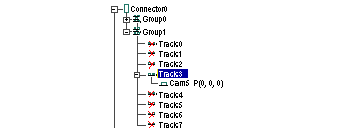
The browser displays the cam that has been created under the track to which it belongs.
Example: creation of cam 5 under track 3 of group 1 of connector 0
 |
