|
Parametering for the tracks
|
|


|
(Original Document)
|
|
Parametering for the tracks
|
|
|
(Original Document)
|
|
Step
|
Action
|
|---|---|
|
1
|
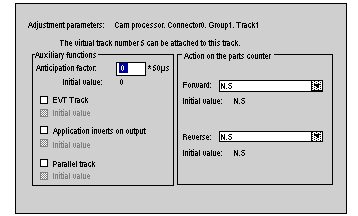
Double-click on the track to be parameterized.
Result:
 |
|
2
|
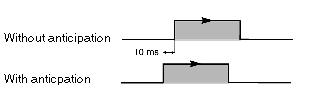
Enter the value of the anticipation factor from 0 to 32767 x 50 micro s.
This factor makes it possible to anticipate all switches of track in order to compensate for the delay caused by the actuators of the machine.
Example: anticipation with a factor of 200
 |
|
3
|
Select EVT Track to trigger an event at each change of track.
|
|
4
|
Check Invert application on output to invert the status of the track when the cam processor is in "Run" mode.
This inversion has no effect when the processor is in "Stop". The track remains at 0.
If the track does not have a cam, this function does not apply.
|
|
5
|
If the track is to perform operations on the parts counter, select the following types of action:
in Forward and/or Reverse direction.
|
|
6
|
Check Parallel track to put a second predefined track (track n+4) from the same group in parallel on the output of track n.
This option allows you to:
If the track does not have a cam, this function does not apply.
Example: if the option is selected on track 1, the value of output 1 will be the "OR logic" of tracks 1 and 5.
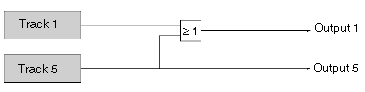 Note: This choice only appears on tracks 0 to 3 of each group.
|
