|
Activating/deactivating the tracks
|
|


|
(Original Document)
|
|
Activating/deactivating the tracks
|
|
|
(Original Document)
|
|
Step
|
Action
|
|---|---|
|
1
|
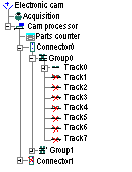
In the browser double click on Connector 0 or 1 then double click in the browser on Group 0, 1, 2 or 3 to access the track(s) to be activated.
Result:
The browser displays all the tracks that are associated with this connector and this group. Tracks that are crossed out are inactive.
|
|
2
|
Click with the right mouse button on the track to be activated and select the Activate command (Deactivate for the reverse operation).
The cross disappears from the activated track.
Example: track 0 of connector 0 group 0 is active and tracks 1 to 7 are inactive.
 |
