|


|
(Original Document)
|
|
|
(Original Document)
|
|
Step
|
Action
|
|---|---|
|
1
|
In the browser, double-click on Acquisition.
Result:
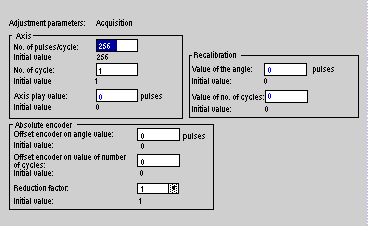 |
|
2
|
Enter the Axis parameters. The parameters that are displayed depend on the reading format chosen in the configuration:
Note:
Choose a value to the power of 2, for the number of pulses per cycle.
Min. value: number of pulses per cycle = 256 and number of cycles = 1
Max. value: 214 (see the formula in step 5 of the table).
|
|
3
|
Enter the encoder offset value (angle and cycle) to obtain a position value equal to 0 when the axis arrives at the machine 0.
This value is the gross value provided by the encoder when the axis is on the machine 0.
The values consist of:
|
|
4
|
Enter the axis play value.
This value is used to compensate for the position error caused by changing the direction of rotation, if there is mechanical play between the drive and the (encoder) axis.
A value of 0 corresponds to no correction.
The values are between -(No of pulses/cycle) /2 and +(No of pulses/cycle) /2. The correction value cannot exceed 1023 pulses.
|
|
5
|
Enter the reduction factor.
This factor reduces the encoder resolution. The position given by the encoder is divided by the reduction factor.
This enables the cam program to be effective over a narrower range of pulses than that given by the machine.
Possible reduction factor values:
1 (the cam program reacts in relation to the actual position of the encoder, no reduction),
2 (the position given by the encoder is divided by 2, 4, 8, 16 or 32).
In addition the following relationship must be checked:
 |
|
6
|
Enter the recalibration value (angle and cycle).
This recalibration value is systematically added to the position value after correction of the encoder offset. It moves the axis in relation to the machine reference point.
The values consist of:
Note:
The position value (angle and cycle) after offset correction and recalibration application is:
Position value = Gross encoder value - Offset + Recalibration
|
