Entering acquisition parameters for an incremental encoder
(Original Document)
Role
This operation defines the recipe adjustment parameters linked with the incremental encoder.
Preliminary conditions
This operation requires an incremental encoder to have been defined during configuration.
Procedure
The following table describes the operations to be performed:
Step
Action
1
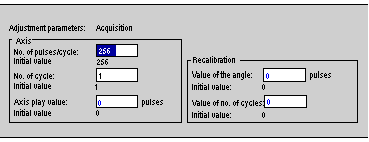
In the browser, double-click on Acquisition.
Result:
2
Enter the Axis parameters. The parameters that are displayed depend on the reading format chosen in the configuration:
  • Type 1: number of pulses per cycle (minimum value 256 and maximum value 32767).
  • Type 2: number of pulses per cycle (minimum value 256 and maximum value 32767) and number of cycles (minimum value 1 and maximum value 32767)
  • Type 3: number of pulses per cycle = 32 767. The value that is displayed cannot be modified. It indicates the counting capacity.
3
Enter the axis play value.
This value is used to compensate for the position error caused by changing the direction of rotation, if there is mechanical play between the drive and the axis (encoder).
If recalibration of the axis is done in the direction of rotation:
  • forward, declare a negative correction value. The correction will be made on reverse movements,
  • reverse, declare a positive correction value. The correction will be made on forward movements.
A value of 0 corresponds to no correction.
The values are between -(No. of pulses/cycle) /2 and +(No. of pulses/cycle) /2. The correction value cannot exceed 1023 pulses.
Note: this correction modifies the switching position of all the cams according to the declared value. Whatever the value of the play entered, the position and captures values sent to the PLC are current values (no corrections).
4
Enter the recalibration value:
  • value of the angle,
  • value of the number of cycles (for type 2 reading format only).
The recalibration value is loaded in the position counter on the recalibration command.
The values are between 0 and + No. of pulses/cycle