|
Configuration of the Counting Module
|
|


|
Original instructions
|
|
Configuration of the Counting Module
|
|
|
Original instructions
|
|
Step
|
Action
|
|---|---|
|
1
|
In the Project browser double-click on Configuration then on 0:Bus X and on 0:BMX XBP ••• (Where 0 is the rack number)
|
|
2
|
In the Bus X window, select a slot (for example slot 1) and double-click
|
|
3
|
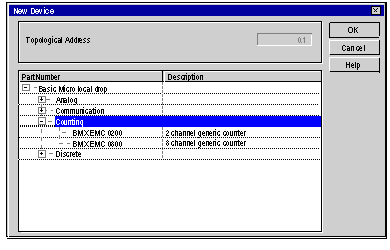
Choose the BMX HEC 0200 counting input module
 |
|
4
|
Confirm with OK.
|
|
Step
|
Action
|
|---|---|
|
1
|
In the Bus X window, double-click on the BMX EHC 0200 counting input module
|
|
2
|
Select a channel (for example Counter 0) and click
|
|
3
|
Select the module function Modulo Loop Counter Mode
|
|
4
|
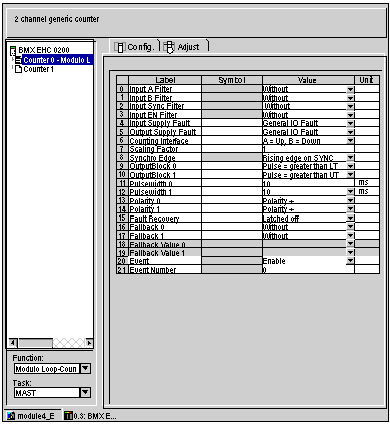
In the Config tab, configure the OutputBlock 0 reflex output with a pulse when the counting is greater than the Lower Threshold (Pulse = greater than LT) and the OutputBlock 1 reflex output with a pulse when the counting is greater than the Upper Threshold (Pulse = greater than UT). Then click on the Event value and select Enable.
 |
|
5
|
Click on the Adjust tab and enter the modulo value (for example 50).
|
|
Step
|
Action
|
|---|---|
|
1
|
In the BMX EHC 0200 window, click on the BMX EHC 0200 and then on the I/O objects tab
|
|
2
|
Click on the I/O object prefix address %CH then on the Update grid button, the channel address appears in the I/O object grid
|
|
3
|
Click on the line %CH0.1.0 and then enter a channel name in the Prefix for name zone
|
|
4
|
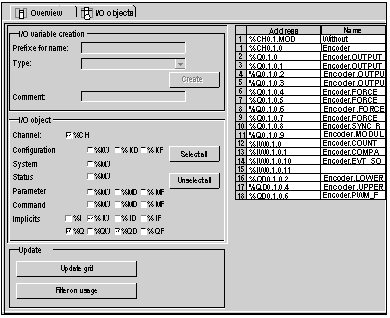
Now click on different Implicit I/O object prefix addresses then Update grid button to see the names and addresses of the implicit I/O objects.
 |
