|
Creating the Project
|
|


|
Original instructions
|
|
Creating the Project
|
|
|
Original instructions
|
|
Step
|
Action
|
|---|---|
|
1
|
Launch the Control Expert software.
|
|
2
|
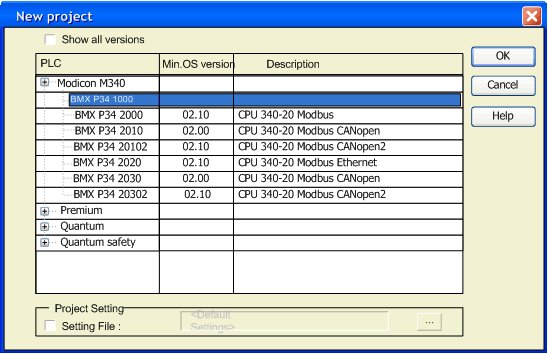
Click on File then New to select a PLC.
 |
|
3
|
To see all PLC versions, click on the box Show all versions.
|
|
4
|
Select the processor you wish to use from those proposed.
|
|
5
|
To create a project with specific values of project settings, check the box Settings File and use the browser button to localize the .XSO file (Project Settings file). It is also possible to create a new one.
If the Settings File box is not checked , default values of project settings are used.
|
|
6
|
Terminate your configuration, insert a BMX EHC 0200 input module.
|
|
7
|
Confirm with OK.
|
