|
Declaration of Variables
|
|


|
Original instructions
|
|
Declaration of Variables
|
|
|
Original instructions
|
|
Step
|
Action
|
|---|---|
|
1
|
In Project browser / Variables & FB instances, double-click on Elementary variables
|
|
2
|
In the Data editor window, select the box in the Name column and enter a name for your first variable.
|
|
3
|
Now select a Type for this variable.
|
|
4
|
When all your variables are declared, you can close the window.
|
|
Variable
|
Type
|
Definition
|
|---|---|---|
|
Run
|
EBOOL
|
Startup request for the labelling process.
|
|
Stop
|
EBOOL
|
Stop the labelling process.
|
|
Last_Box_late
|
BOOL
|
The process is in deflection.
|
|
Nb_Box
|
DINT
|
Number of labelled boxes.
|
|
Position_0
|
BOOL
|
Box at the beginning of the conveyor.
|
|
Position_1
|
BOOL
|
Box with the first label.
|
|
Position_2
|
BOOL
|
Box with the two labels.
|
|
First_Labelling_Point
|
DINT
|
Lower Threshold value.
|
|
Second_Labelling_Point
|
DINT
|
Upper Threshold value.
|
|
Deflection_Parameter
|
DINT
|
Deflection alarm triggering value.
|
|
Waiting_First_Part
|
BOOL
|
The first box is waited.
|
|
Waiting_Other_Parts
|
BOOL
|
The first box has already passed.
|
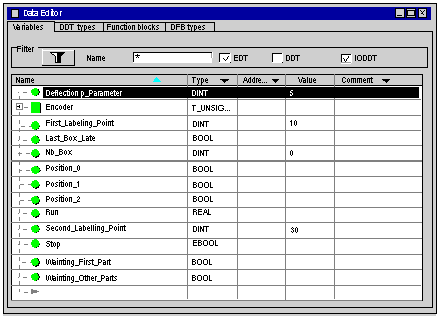
 in front of the derived variable Encoder to expand the I/O objects list.