|
How to Access the Force/Unforce Function of the AS-I Channels
|
|


|
(Original Document)
|
|
How to Access the Force/Unforce Function of the AS-I Channels
|
|
|
(Original Document)
|
|
Step
|
Action for one channel
|
Action for all channels
|
|---|---|---|
|
1
|
Open the Fipio/AS-i gateway to set up.
|
|
|
2
|
Access the diagnostics screen by clicking on the Debug tab.
|
|
|
3
|
Select a slave in the AS-i Configuration area.
|
|
|
4
|
Select the channel to modify in the slave area table.
Result: The channel can be modified using the buttons in the Channel action field.
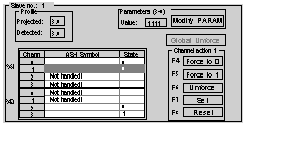 |
Click on the Global unforcing button in the slave zone.
|
|
5
|
Select the required function (buttons Force to 0 or Force to 1 or Unforce) in the Channel Action field.
|
|
