|
How to Access the Settings of the AS-I Device Parameters
|
|


|
(Original Document)
|
|
How to Access the Settings of the AS-I Device Parameters
|
|
|
(Original Document)
|
|
Step
|
Action
|
|---|---|
|
1
|
Open the Fipio/AS-i gateway to set up.
|
|
2
|
Access the diagnostics screen by clicking on the Debug tab.
|
|
3
|
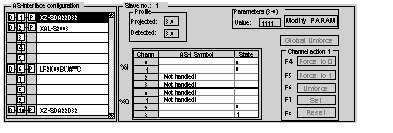
In the AS-i Configuration area, select the faulty slave.
Result: in the slave zone of the debug screen, it is possible to read all the information relating to the selected slave.
 |
|
4
|
Click on the Modify PARAM button situated in the slave zone’s Parameters field.
Result: the Modify parameters window appears.
 |
|
5
|
Modify the required parameters.
|
|
6
|
Click on Send to take into account the new values.
|
