|
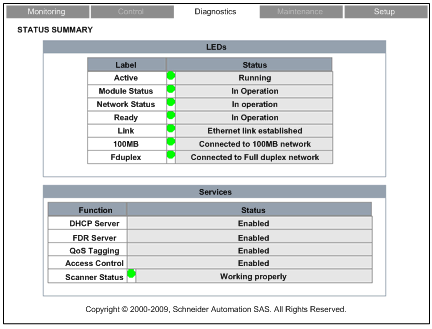
Status Summary
|
|


|
(Original Document)
|
|
Status Summary
|
|
|
(Original Document)
|
|
Step
|
Action
|
|---|---|
|
1
|
Starting at the Home page, click the Diagnostics main menu item. The Diagnostics page opens.
|
|
2
|
On the left side of the Diagnostics page, select Ethernet → Status Summary.
|
|
3
|
If necessary, type in the HTTP web access password.
NOTE: The default password is USER. |
|
LED
|
Color
|
Text Descriptions
|
|---|---|---|
|
Active
|
Green
|
Running
|
|
Red
|
Error present
|
|
|
Module Status)
|
Green
|
In operation
|
|
Red
|
Not configured
|
|
|
Fault detected
|
||
|
Recoverable fault detected
|
||
|
Network Status)
|
Green
|
Connections established
|
|
Red
|
Connection error
|
|
|
Duplicate IP address
|
||
|
Ready
|
Green
|
In operation
|
|
Red
|
Duplicate IP address
|
|
|
Waiting for Served IP Configuration
|
||
|
Default IP in use
|
||
|
Configuration error
|
||
|
Link
|
Green
|
Ethernet link established
|
|
Red
|
No Ethernet link established
|
|
|
100MB
|
Green
|
Connected to 100MB network
|
|
Gray
|
Not connected to 100MB network
|
|
|
Fduplex
|
Green
|
Connected to Full duplex network
|
|
Gray
|
Not connected to Full duplex network
|
|
Function
|
Color
|
Text Descriptions
|
|---|---|---|
|
DHCP Server
|
—
|
Enabled
|
|
FDR Server
|
Disabled
|
|
|
QoS Tagging
|
||
|
Access Control
|
||
|
Scanner Status
|
Green
|
Working properly
|
|
Red
|
At least one connection is bad
|
|
|
Gray
|
Not configured
|
