Enabling Services
(Original Document)
Description
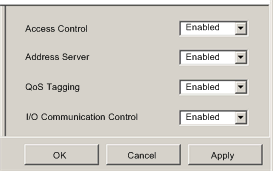
Use the Services page to enable and disable Ethernet services provided by the communications module.
NOTE: After you enable a service, you can configure its settings. Control Expert applies default settings to each service you enable, but elect not to configure.
The Services page looks like this:
To display this page, select the Services node in the navigation tree located on the left side of the Device Editor.
When you Enable a service, Control Expert displays a node for that service in the navigation tree on the left side of the Device Editor, beneath the Services parent node. Click on a service node to access its settings.
When you Disable a service, Control Expert hides the node for that service.
NOTE: Refer to the topic Configuring Properties in the Device Editor for instructions on how to edit properties.
Properties
The Ethernet communication module can be configured to provide the following services:
If this service is enabled...
The module can...
SNMP
  • serve as an SNMP v1 agent
  • provide trap information to up to two devices configured as SNMP managers.
NOTE: The SNMP service is enabled by default, and cannot be disabled.
Access Control
deny access to the Ethernet communication module by unauthorized network devices.
Address Server
provide both IP addressing parameters and operating parameters to other Ethernet devices.
QoS Tagging
add Differentiated Services Code Point (DSCP) tags to Ethernet packets so that network switches can prioritize the transmission and forwarding of Ethernet packets.
NOTE: Before enabling QoS tagging, confirm that devices connected to the Ethernet communication module support QoS tagging.
I/O Communication Control
allow the Control Expert application to control the enabling and disabling of individual connections between the communication module and remote I/O devices.
NOTE:
  • The application can open and close individual connections using the control bits located at the beginning of the output area.
  • If this service is disabled, the user, via the application program, cannot toggle on and off connection control bits