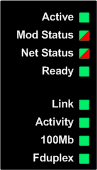
The 140 NOC 771 01 Ethernet communication module displays the following LED indicators:
Use the LED display to diagnose the state of the module, as follows:
|
LED
|
Color
|
Description
|
|
Active
|
Green
|
|
|
Mod Status (Module Status)
|
Green/ Red
|
-
Off: Power is not being supplied to the module.
-
Steady Green: The module is operating normally.
-
Blinking Green: The module has not been configured.
-
Steady Red: The module has detected a major event.
-
Blinking Red: The module is not properly configured.
|
|
Net Status (Network Status)
|
Green/ Red
|
-
Off: Power is not being supplied to the module or the module does not have an IP address assigned.
-
Steady Green: The module has established at least one CIP connection.
-
Blinking Green: The module has obtained an IP address but has not established any CIP connections.
-
Steady Red: The module has detected that its IP address is a duplicate IP address.
-
Blinking Red: One or more exclusive owner CIP connection (with the module as target) have timed out. All the timed-out exclusive owner CIP connections have not yet been re-established.
|
|
Ready
|
Green
|
-
Off: No power is supplied to the module.
-
Steady Green: Indicates that the module is operating normally.
-
Two flashes: The MAC address is missing.
-
Three flashes: The Ethernet link is not connected.
-
Four flashes: The module has detected a duplicate IP address.
-
Five flashes: The module is waiting for a served IP address.
-
Six flashes: The module is using its default IP address.
-
Seven flashes: The module has detected a configuration error.
NOTE: If more than one diagnostic condition exists simultaneously, the Ready LED displays the shortest flash sequence.
|
|
Link
|
Green
|
|
|
Activity
|
Green
|
|
|
100Mb
|
Green
|
|
|
Fduplex (Full Duplex)
|
Green
|
|