


General
| WARNING | |
|---|---|
CHARTREF
Association with the SFC to be controlled.
If an SFC section
is created then it is automatically assigned with a variable of data
type SFCCHART_STATE. The variable that is created
always has the name of the respective SFC section.
This variable
is used for assigning the function block SFCCNTRL to the SFC section to be controlled.
SFCCHART_STATE can’t be created by the
user, and the value cannot be modified; so in the animation table
this variable cannot be modified and the value field stay empty.INIT
Reset sequence and start normally.
This input to the function block has the highest priority, above all other inputs.
Reset sequence
With a 0->1 Edge at the input, the sequence is stopped and all steps are reset. No operator access is possible.
This status remains as long as the input is 1. The status (sequence reset) is shown with a 1 signal at the output
CLEARST.Start sequence normally
With a 1->0 edge at the input and 0 at
CLEAR, the sequence is started normally, i.e. the initial step is activated. This is shown for one cycle with a 1 signal at the outputINITST.
Interaction of INIT, CLEAR, INITST and CLEARST:
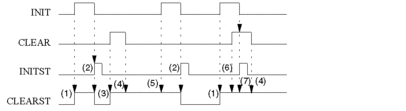
Interaction of INIT, CLEAR, INITST and CLEARST:
Phase |
Description |
|---|---|
1 |
If there is a 0->1 edge at input |
2 |
If there is a 1->0 edge at input |
3 |
If there is a 0->1 edge at input |
4 |
A 1->0 edge at input |
5 |
If the sequence is already in the
status "reset", a 0->1 edge at input |
6 |
If the sequence is already in the
status "reset", a 0->1 edge at input |
7 |
When |
CLEAR
Reset sequence
With a 0->1 Edge at the input, the sequence is stopped and all steps are reset. No operator access is possible.
The status (sequence reset) is shown with a 1 signal at the output CLEARST.
This state remains even if input reverts back to 0.
The sequence can only be started by a 1->0 edge
on the input INIT, of the function INITCHART or another
step activation command (external), while CLEAR is
0.
DISTIME
Turn off time monitoring
The time monitoring of the active step is suppressed by a 1 signal at the input. The execution time will continue to be calculated, but no error will be reported if the time is outside the upper and lower limits.
Already existing
errors are not affected by this function (Animation or Output TERRACT).
DISTRANS
Turn off transition evaluation
The current state of the sequence is frozen by a 1 signal at the input. The status of the transitions is no longer evaluated. Therefore, it is no longer possible to move on in the sequence, even if the transition condition of the "active" transition is true.
This function can be used in conjunction
with STEPUN and STEPDEP for error correction.
DISACT
Turn off processing of the actions
All active actions are reset with a 1 signal at the input.
STEPUN
Activate the next step, independent of the transition condition
With a 0->1 edge at the input, independent of the status of the transition condition, the current active step(s) are deactivated and the next step(s) is activated. However, this occurs first after the delay time (step time) of the active step has run out.
Using this command with simultaneous branching, all branches are activated and for alternative branching, the left branch is always activated.
The input STEPDEP is
used for process dependent activation of branches.
STEPDEP
Activate the next step, dependent on the transition condition
With a 0->1 edge at the input and a successful transition condition, the next step(s) is activated. However, this occurs first after the delay time (step time) of the active step has run out.
The control
command is only sensible when there is a 1 signal at the input DISTRANS.
By freezing the transitions(DISTRANS = 1), it
is possible to manually process the sequence, step by step, with this
control command. In this way, the transitions are dependent on the
transition conditions.
RESETERR
Reset the time monitoring error.
With a 0->1 edge at the
input, display of all time monitoring errors with the animation of
the SCF section are turned off. Currently displayed time monitoring
errors are updated. Existing time monitoring errors are reported anew.
If there are no time monitoring errors, the output TERRACT is reset.
DISRMOTE
Prevent control of the chart using processing parameters of the SFC Animation Panel.
A 1 signal at the input prevents control
of the SFC chart with the processing parameters of the SFC Animation
Panel (initialize, turn off time monitoring, turn off evaluation of
the transitions, turn off processing of the actions). Despite this,
the SFC chart continues to be controlled by the SFCCNTRL function block.
Setting DISRMOTE to 1 means
that SFCNTRL is dominant. If DISRMOTE is not set or is set to 0, the inputs DISTRANS, DISACT, DISTIME and INIT of the SFCNTRL function block and the corresponding
inputs in the SFC Animation Panel are treated as a logical OR combination.
Setting DISRMOTE to 1 causes that the controls
of the SFC Animation Panel are disabled.
Setting DISRMOTE to 0 causes that the controls of the SFC Animation Panel are enabled
and all other components of the SFC section variable (SFCCHART_STATE) stay unchanged.
When setting DISRMOTE to
1 or 0 the value is assigned to the SFC section variable of the controlled
SFC chart.
This causes a problem, if the SFCCNTRL function block sets the variable to 1 (and blocks the SFC Animation
Panel) and then the SFCCNTRL function block instance
is deleted. In this case, the blocking value stays till next in offline mode.
This problem could happen when
the SFC section variable assigned to the
CHARTREFinput is replaced in online mode (meaning that theSFCCNTRLfunction block instance is assigned to another SFC section),the
SFCNTRLfunction block instance is deleted orthe section with the
SFCNTRLfunction block instance is deleted.
Work around for online mode: Create a new SFCCNTRL function block instance, assign the correct SFC section name to
the CHARTREF input and set DISRMOTE to 0. This will unblock the SFC Animation Panel. Now you can delete
this SFCCNTRL function block instance again.
Preventing the problem: To prevent to described problem, always
make sure that DISRMOTE is set to 0 before deleting
a SFCCNTRL function block instance.
ALLTRANS
Calculate all transition sections
With a 1 signal at the input, all transition sections are calculated (even if the corresponding step is not active). For processing of the sequence, only the active transitions continue to be evaluated. This function only serves to display the animation of all transition statuses simultaneously.
RESSTEPT
Deactivate time calculation
With a 0->1 signal, all time
monitoring errors (minimum and maximum monitoring time), the elapsed
time since activation of the step and the output TERRACT are all reset. As well, all time errors in the diagnosis are cancelled
and the time monitoring of the step is stopped. This status is valid
as long as the 1 signal is present.
With a 1->0 edge, all times (starting with 0) are recalculated and the time monitoring is activated.
RESSTEPT function is active,
steps with a defined delay time are never activated. (With RESSTEPT, the current step time is reset continually and
so the defined delay time can never be achieved.)INITST
Sequence started normally
With a 1->0 edge at the input INIT, the sequence is started normally, i.e. the initial
step is activated. This is shown for one cycle with a 1 signal at
the output INITST.
see also INIT
INITCHART or another
external control command.CLEARST
Sequence was reset
With a 0->1 Edge at the input INIT or CLEAR, the sequence is stopped
and all steps are reset.
This state is maintained until a 1->0
edge at the input INIT occurs.
see also INIT
INITCHART, CLEARCHART or RESETSTEP (reset the
last/only active step) or another external control command.TIMEDIS
Time monitoring was turned off
The output is 1 if the display
of the time error was turned off, independent of if the display was
turned off with the function block itself (input DISTIME) or
via SFC control commands.
TRANSDIS
Evaluation of the transitions was turned off
The output is 1 if the evaluation of the transitions was stopped.
FREEZECHART or another
external SFC control command.ACTDIS
Processing of the actions was turned off and all actions in the sequence were reset
The output is 1 if the display of the actions
was stopped, independent of if the display was stopped with the function
block itself (input DISACT) or
via SFC control commands.
MODECHG
Operation mode of the sequence was changed
The output is
1 for a cycle, if one or more operation modes of the sequence was
changed, independent of if the change was done with the function block
itself (setting or resetting the inputs INIT, CLEAR, DISTIME, DISACT or DISTRANS) or
via external SFC control commands.
STATECHG
Status of the sequence was changed
The output is 1 for a cycle, if the status of the sequence was changed, independent of if the change was caused by processing the sequence, done with the function block itself or via external SFC control commands.
TIMEERR
An error in the time monitoring has occurred
The output is 1 for a cycle if one or more time monitoring errors have occurred.
TERRACT
There is currently an error in the time monitoring
The output remains 1 when one or more time monitoring errors exist.