


Function description
This function block is to control the execution sequences.
For example, you can go through step by step, processing transition conditions can be turned on or off or the sequence can be reset to its initialization state.
| WARNING | |
|---|---|
| WARNING | |
|---|---|
| WARNING | |
|---|---|
EN and ENO can be configured as additional parameters.
Representation in FBD
Representation:

Representation in LD
Representation:
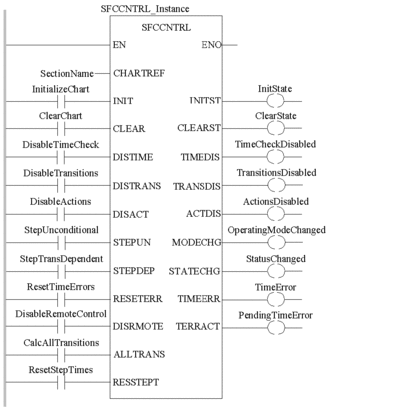
Representation in IL
Representation:
CAL SFCCNTRL_Instance (CHARTREF:=SectionName,
    INIT:=InitializeChart, CLEAR:=ClearChart,
    DISTIME:=DisableTimeCheck, DISTRANS:=DisableTransitions,
    DISACT:=DisableActions, STEPUN:=StepUnconditional,
    STEPDEP:=StepTransDependent, RESETERR:=ResetTimeErrors,
    DISRMOTE:=DisableRemoteControl,
    ALLTRANS:=CalcAllTransitions, RESSTEPT:=ResetStepTimes,
    INITST=>InitState, CLEARST=>ClearState,
    TIMEDIS=>TimeCheckDisabled, TRANSDIS=>TransitionsDisabled,
    ACTDIS=>ActionsDisabled, MODECHG=>OperatingModeChanged,
    STATECHG=>StatusChanged, TIMEERR=>TimeError,
    TERRACT=>PendingTimeError)
Representation in ST
Representation:
SFCCNTRL_Instance (CHARTREF:=SectionName,
    INIT:=InitializeChart, CLEAR:=ClearChart,
    DISTIME:=DisableTimeCheck, DISTRANS:=DisableTransitions,
    DISACT:=DisableActions, STEPUN:=StepUnconditional,
    STEPDEP:=StepTransDependent, RESETERR:=ResetTimeErrors,
    DISRMOTE:=DisableRemoteControl,
    ALLTRANS:=CalcAllTransitions, RESSTEPT:=ResetStepTimes,
    INITST=>InitState, CLEARST=>ClearState,
    TIMEDIS=>TimeCheckDisabled, TRANSDIS=>TransitionsDisabled,
    ACTDIS=>ActionsDisabled, MODECHG=>OperatingModeChanged,
    STATECHG=>StatusChanged, TIMEERR=>TimeError,
    TERRACT=>PendingTimeError) ;
Parameter description
Description of input parameters:
Parameter |
Data type |
Description |
|---|---|---|
|
SFCCHART_STATE |
Association with the SFC section to be controlled is done via the name of the section If an SFC
section is created then it is automatically assigned with a variable
of data type |
|
|
0->1: Reset all active steps in the sequence. 1->0: Start standard sequence (set initial step) |
|
|
0->1: Reset all active steps in the sequence. |
|
|
1: Turn off time monitoring |
|
|
1: Turn of evaluation of the transitions (freeze sequence) |
|
|
1: Turn off processing of the actions and reset all actions in the sequence |
|
|
0->1: Activate the next step, independent of the transition condition |
|
|
0->1: Activate the next step, dependent on the transition condition |
|
|
0->1: Reset the time monitoring error. |
|
|
1: Prevent control of the sequence using processing parameters of the Online Animation Panel |
|
|
1: Calculate all transition sections |
|
|
0->1: Deactivate and reset time calculation 1->0: Restart time calculation Reminder: If the |
Description of output parameters:
Parameter |
Data type |
Description |
|---|---|---|
|
|
1: Sequence was started normally (on for only one cycle) |
|
|
1: Sequence was reset, i.e. the sequence has no active step |
|
|
1: Time monitoring was turned off |
|
|
1: Evaluation of the transitions was turned off |
|
|
1: Processing of the actions was turned off and all actions in the sequence were reset |
|
|
1: Operation mode of the sequence was changed (on for only one cycle) |
|
|
1: Status of the sequence was changed (on for only one cycle) |
|
|
1: Error in the time monitoring has occurred (on for only one cycle) |
|
|
1: There is currently an error in the time monitoring |