


Cause of a Cold Start
The following table describes the different possible causes of a cold start.
Causes |
Startup characteristics |
|---|---|
Loading of an application |
Cold start forced in STOP |
Restore application from memory card, when the application is different from the one in internal RAM |
Cold start forced in STOP or RUN mode as defined in the configuration |
Restore application from memory card, with Control Expert commands |
Cold start forced in STOP. The start in RUN mode as defined in the configuration is not taken into account |
RESET button pressed on supply |
Cold start forced in STOP or RUN mode as defined in the configuration |
RESET button pressed on supply less than 500ms after a power down |
Cold start forced in STOP or RUN mode as defined in the configuration |
RESET button pressed on supply after a processor error, except in the case of a watchdog error |
Cold start forced in STOP. The start in RUN mode as defined in the configuration is not taken into account |
Initialization from Control Expert Forcing the system bit %S0 |
Start in STOP or in RUN (retaining the operating mode in progress at downtime), initialization only of application |
Restoral after power supply outage with loss of context |
Cold start forced in STOP or RUN mode as defined in the configuration |
| CAUTION | |
|---|---|
| CAUTION | |
|---|---|
| CAUTION | |
|---|---|
Illustration
The diagram below describes how a cold restart operates.
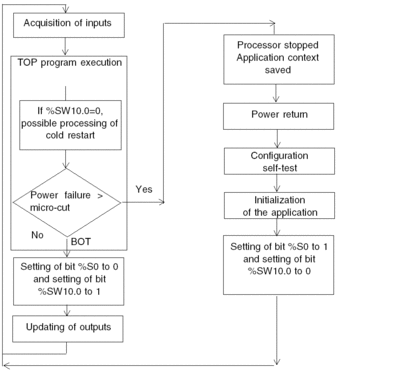
Operation
The table below describes the program execution restart phases on cold restart.
Phase |
Description |
|---|---|
1 |
The startup is performed in RUN
or in STOP depending on the status of the Program execution is resumed at the start of the cycle. |
2 |
The system carries out the following:
|
3 |
For this first restart cycle the system does the following:
|
Processing a cold start by program
It is advisable to test the bit %SW10.0 to detect a cold start and start processing specific to this cold start.
Automatic
start in RUN has been selected. If this is not the case,
the PLC starts in STOP, the bit %S0 then switches to 1 on the first
cycle after restart but is not visible to the program because it is
not executed.Output Changes
As soon as a power outage is detected, the outputs are set in the fallback position:
either they are assigned the fallback value,
or the current value is maintained,
depending on the choice made in the configuration.
After power restoral, the outputs remain at zero until they are updated by the task.