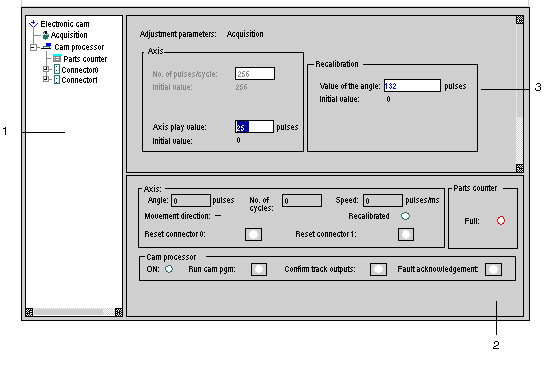
This screen is used to enter and/or modify the parameters of the without stopping the processor treatment. This mode is used to access a certain number of adjustment parameters.
The layout of this recipe adjustment zone is identical to the "adjust recipe" screen. Only one function can be modified at a time.
The debug zone remains simultaneously in these modes.
Adjustment Screen
This table describes the different zones:
|
Address
|
Description
|
|
1
|
Selection zone
|
|
2
|
Main debug zone
|
|
3
|
Adjustment zone (e.g.: )
|
Confirming new parameters
After modifying parameter values during debugging, the user should press the confirm button. A request is then sent to the module. The module acknowledges the modification without stopping the . The modification is in the current module parameters. Switch to Adjust Recipe mode to save them as initial parameters.