Accessing the debug screen
On the module screen, select the debug mode by clicking on the corresponding tab.
This screen is used to find out:
-
the module status, by displaying the various errors which may have arisen
-
the present status of the application-specific function,
-
forcing the commands, performing , setting the module to RUN or to STOP, and confirming or locking the track action on the outputs.
-
the status of the s, locking the outputs,
It can be used to reactivate protected outputs and acknowledge errors.
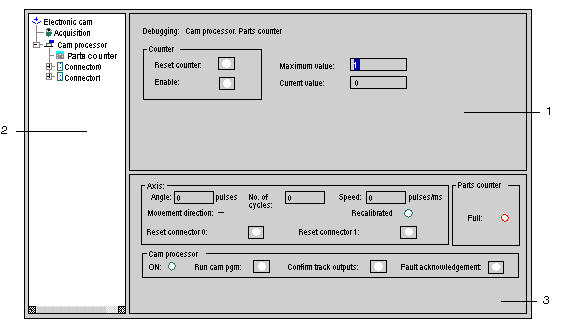
The part specific to the CCY 1128 of the debug screen is composed of 3 parts:
This table describes the different parts:
|
Address
|
Description
|
|
1
|
Debug zone for the selected function.
|
|
2
|
Browser zone: used to select a function.
|
|
3
|
Main debug zone: used to access the main objects
|