|
Cam processor configuration
|
|


|
(Original Document)
|
|
Cam processor configuration
|
|
|
(Original Document)
|
|
Step
|
Action
|
|---|---|
|
1
|
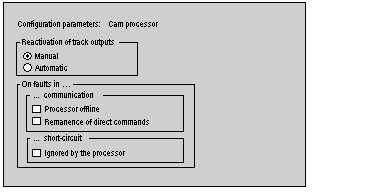
In the browser, click on cam processor.
Result:
 |
|
2
|
Select the type of output reactivation: Manual or Automatic.
When an overcurrent is detected on an output, it is tripped, and it can be reactivated:
|
|
3
|
Select the behavior of the cam processor module on a communication fault between the PLC processor and the electronic cam module.
See table below.
|
|
4
|
Select the behavior of the cam processor on a short-circuit fault:
|
|
Check boxes selected
|
Cam processor state
|
State of the logic outputs
|
|---|---|---|
|
None
|
change to stop
|
set to 0
|
|
Processor offline
|
normal operation, (remains in RUN)
|
set to 0
|
|
Remanence of direct commands
|
change to stop
|
same as the last direct commands transmitted by the PLC processor;
|
|
Processor offline and Remanence of direct commands
|
normal operation, (remains in RUN)
|
or logic between:
|
