Entering configuration parameters
(Original Document)
Hardware configuration
The hardware configuration is as follows:
Procedure
The stages are as follows:
Step
Action
1
  • Select the TSX CCY 1128 module at its position n°3 in rack n°0.
  • Double-click on the module.
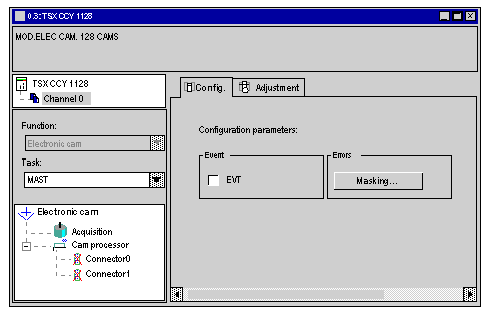
Result: the module hardware configuration screen appears:
2
The Configuration tab is selected.
  • Double-click with the left button on Acquisition in the browser
3
Select
  • For the Input interface: Incremental encoder.
  • For the Measurement Format: Type 1.
  • For the position Recalibration on Irec: Short cam
  • Confirm with the toolbar button.
4
  • Double-click with the left button on Acquisition in the Browser.
  • Confirm with the toolbar button.
5
  • Configure 1024 for No. of pulses/cycle.
6
  • Click on the Configuration tab.
  • Confirm.
  • Click with the right button on Connector 0.
  • Unlock.
7
  • Click on the Adjust tab.
  • Confirm with yes.
  • Double-click with the left button on Connector 0.
  • Double-click with the left button on Group 0.
  • Click with the right button on track 0.
  • Activate.
  • Click with the right button on track 0.
  • Create Cam ...
  • Select 0.
  • Confirm with OK.
8
  • Double-click with the left button on cam 0.
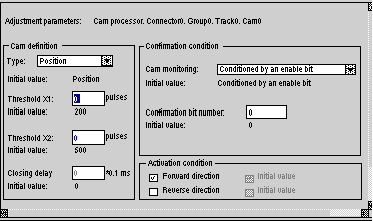
Result: the parameter adjustment screen appears.
9
Configure
  • for ThresholdX1:200, and
  • for ThresholdX2: 500
Select
  • for Cam monitoring (in the Enable conditions): Conditioned by an enable bit
  • for the Activation Condition: Forward
Enable the configuration entered with the toolbar button.