The following information describes how to assign IP address parameters.
As shipped from the factory, the 140 NOE 771 xx module does not contain an IP address. If you have not programmed the unit with an Ethernet configuration extension, the module does not contain an IP address. When the module starts up without an IP address, the module will attempt to obtain an IP address from the network’s BOOTP server.
You can assign IP address parameters using the BOOTP Lite software utility.
NOTE: You can configure the IP address using Web pages on the modules 140 NOE 771 01, -11, and NWM 100 00.
A BOOTP server is a program that manages the IP addresses assigned to devices on the network. Your system administrator can confirm whether a BOOTP server exists on your network and can help you use the server to maintain the adapter’s IP address.
How an Unconfigured Module Obtains an IP Address
On startup, an unconfigured NOE 771 xx module ("as shipped") will attempt to obtain an IP address by issuing BOOTP requests. When a response from a BOOTP server is obtained, the IP address in the response is used. If no BOOTP response is received within two minutes, the module uses the default IP address derived from its MAC address.
NOTE: The MAC address is assigned at the factory and is recorded on a label on the front panel, above the cable connector. This is a unique 48-bit global assigned address. It is set in PROM. The Ethernet address is recorded on the label in hexadecimal, in the form 00.00.54.xx.xx.xx.
Connecting to the Default IP Address
To connect to the default IP address with your PC, set up an active route from your PC. To do this with Windows 95/98/ME/NT/2000 or Windows XP, use the following procedure. You can use the routes for connecting Ethernet components with other address ranges.
|
Step
|
Action
|
|
1
|
Be sure the NOE module is running.
|
|
2
|
Obtain the default IP address of the NOE derived from its MAC address (for example, 84.0.0.2).
|
|
3
|
Open an MS-DOS window.
|
|
4
|
Add an active route for the local NOE by typing:
C:\>ROUTE ADD <target> MASK <mask> <gateway>
e.g.
C:\>ROUTE ADD 84.0.0.0 MASK 255.0.0.0 205.217.193.205
Use the default IP address of the NOE module as target address. Use a class A subnet mask for connecting to every 84.0.0.0 address. The gateway address is the IP of your PC. The result is that MS Windows will now talk to any address that starts with an 84 that is directly connected to a hub or switch directly accessible to your machine, or that can be seen by the specified route/gateway.
|
|
5
|
Confirm that there is a new entry in the active route table by typing:
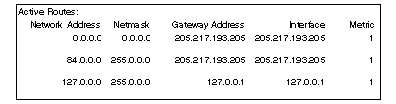
C:\>route print:
The following figure confirms that the new entry was added to the active route table.
|
|
6
|
Verify that a connection is made by typing:
C:\>ping 84.0.0.2
The following figure shows that the connection is verified.
|
Specifying Address Parameters
Consult your system administrator to obtain a valid IP address and an appropriate gateway and a subnet mask, if required. Then use your programming panel to make the appropriate changes.
If the server responds with address parameters, the NOE 771 xx module will use those parameters as long as power remains applied to the module.
If the server does not respond, the module will retry its request for two minutes.
BOOTP Server Does Not Respond
If no BOOTP response is received, the NOE 771 xx module will use the default IP Address.
During this time the Run indicator displays a pattern of five flashes for a BOOTP attempt and six flashes for using the default IP.
NOE 771 xx Duplicate IP Address Test
In all cases, when the NOE 771 xx module receives an IP address, it will test for duplicate addresses by sending broadcast requests three times at 5-second intervals.
If a Duplicate IP Address is found on the network, the NOE 771 xx will stay off-line to avoid a network disruption. It will display a pattern of four flashes to indicate a Duplicate IP Address detection.
If there are no replies to its requests, the NOE 771 xx automatically sends three requests at 2-second intervals to announce its presence on the network.


 CAUTION