Fitting 28-pin Terminal Blocks
Original instructions
Overview
BMXERT1604T/H module with 28-pin terminal block connection requires terminal block to be connected to the module. These fitting operations (assembly and disassembly) are described below.
DANGER
ELECTRICAL SHOCK
Terminal block must be connected or disconnected with sensor and pre-actuator voltage switched off.
Failure to follow these instructions will result in death or serious injury.
Installing the 28-pin Terminal Block
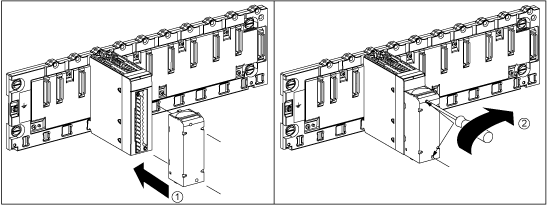
The following figure shows the procedure for assembling the 28-pin terminal block onto a BMXERT1604T/H module.
The following table describes the assembly procedure of the 28-pin terminal block onto a BMXERT1604T/H module:
Step
Action
1
Once the module is in place on the rack, install the terminal block by inserting the terminal block encoder (the rear lower part of the terminal) into the module's encoder (the front lower part of the module), as shown above.
2
Fix the terminal block to the module by tightening the 2 mounting screws located on the lower and upper parts of the terminal block.
Tightening torque: 0.4 N•m (0.30 lb-ft).
NOTE: If the screws are not tightened, there is a risk that the terminal block will not properly fix to the module.
Coding the 28-Pin Terminal Block
WARNING
UNEXPECTED BEHAVIOR OF APPLICATION
Code the terminal block as described above to prevent the terminal block from being mounted on another module.
Plugging the wrong connector could cause unexpected behavior of the application.
Failure to follow these instructions can result in death, serious injury, or equipment damage.
CAUTION
DESTRUCTION OF THE MODULE
Code the terminal block as described above to prevent the terminal block from being mounted on another module.
Plugging the wrong connector could cause the module to be destroyed.
Failure to follow these instructions can result in injury or equipment damage.
When a 28-pin terminal block is installed on a module dedicated to this type of terminal block, you can code the terminal block and the module using studs. The purpose of the studs is to prevent the terminal block from being mounted on another module. Incorrect insertion can be avoided when replacing a module.
Coding is done by the user with the STB XMP 7800 guidance wheel's studs. You can only fill the 6 slots in the middle of the left side (as seen from the wiring side) of the terminal block, and can fill the module's 6 guidance slots on the left side.
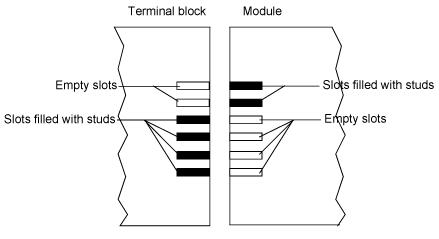
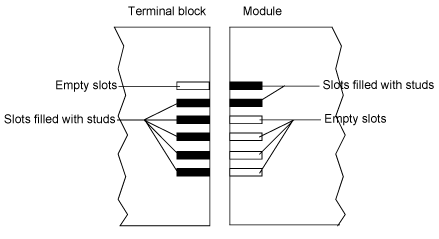
To fit the terminal block to the module, a module slot with a stud must correspond to an empty slot in the terminal block, or a terminal block with a stud must correspond to an empty slot in the module. You can fill upto and include any of the 6 available slots as desired.
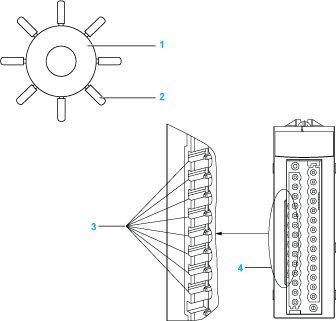
The following diagram shows a guidance wheel and the slots on the module used for coding the 28-pin terminal blocks.
1 
Guidance wheel
2 
Detachable stud
3 
Guidance slots
4 
Module slots
The following diagram shows an example of a coding configuration that makes it possible to fit the terminal block to the module.
The following diagram shows an example of coding configuration with which it is not possible to fit the terminal block to the module.
NOTE: The module connector has indicators which show the proper direction to use for terminal block installation.