Installing the BMXERT1604T/H Time Stamping Module
Original instructions
Overview
The BMXERT1604T/H time stamping module is powered by the backplane bus. The modules may be handled without turning off power supply to the rack, without causing any danger and without any risk of damage or disturbance to the PLC.
The fitting operations (installation, assembly, and disassembly) are described below.
Installation Precautions
The BMXERT1604T/H module may be installed in any of the positions in the rack except:
Before installing a module, take off the protective cap from the module connector located on the backplane.
DANGER
ELECTRICAL SHOCK
  • If the terminal block is connected to a shield bar while mounting/removing the modules, make sure that the terminal block is still connected to the shield bar.
  • Remove the power to the sensors and pre-actuators.
  • Disconnect the terminal blocks.
Failure to follow these instructions will result in death or serious injury.
Installation
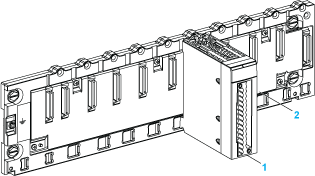
The following figure shows the BMXERT1604T/H module mounted on the rack.
1 
BMXERT1604T/H module
2 
Standard rack
Installing the Module on the Rack
Mount the time stamping module in the rack:
Step
Action
Illustration
1
Position the locating pins situated at the rear of the module (on the bottom part) in the corresponding slots in the rack.
Steps 1 and 2
2
Swivel the module towards the top of the rack so that the module sits flush with the back of the rack. It is now set in position.
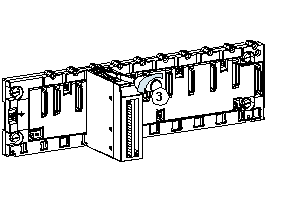
3
Tighten the mounting screw to ensure that the module is held in place on the rack.
Tightening torque: 0.4...1.5 N•m (0.30...1.10 lbf-ft).
Step 3