|
User Screen in Online Mode
|
|


|
Original instructions
|
|
User Screen in Online Mode
|
|
|
Original instructions
|
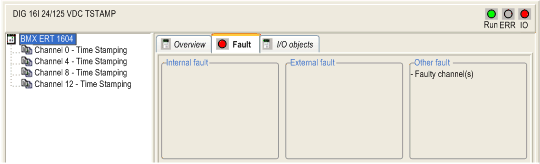
|
Object
|
Type
|
Symbol
|
Description
|
|---|---|---|---|
|
%Ir.m.MOD.ERR
|
BOOL
|
MOD_ERROR
|
Module detected error bit
|
|
%MWr.m.MOD.2
|
INT
|
MOD_FLT
|
Internal detected error INT of the module
|
|
x0
|
BIT
|
MOD_FAIL
|
Internal detected error, module detected failure
|
|
x1
|
BIT
|
CH_FLT
|
Inoperative channels
|
|
x2
|
BIT
|
–
|
Unused
|
|
x3
|
BIT
|
–
|
Module in self tests
|
|
x5
|
BIT
|
CONF_FLT
|
Hardware or software configuration detected error
|
|
x6
|
BIT
|
NO_MOD
|
Module missing or off
|
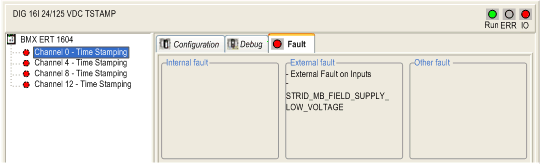
|
Type
|
Symbol
|
Description
|
|---|---|---|
|
EXTERNAL
|
CH_ERROR
|
External detected error on inputs
|
|
INTERNAL
|
INTERNAL_FLT
|
Inoperative channel
|
|
INTERNAL
|
CONF_FLT
|
Hardware or software configuration detected error
|
|
INTERNAL
|
COM_FLT
|
Module missing or off (detected error communication with PLC)
|
|
EXTERNAL
|
EXT_PWS_FLT
|
Power supply detected error for supply monitoring
|
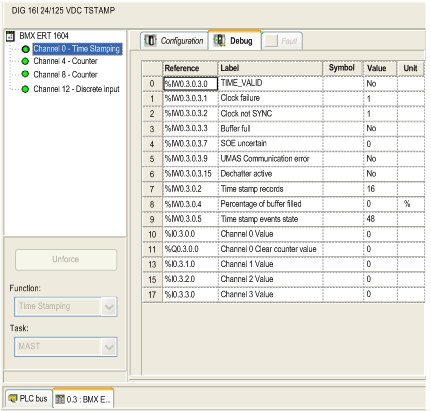
|
Object
|
Type
|
Label
|
Detail
|
|---|---|---|---|
|
%IWr.m.0.3
|
INT
|
–
|
TS_DIAGNOSTIC_FLAGS
|
|
%IWr.m.0.3.0
|
BOOL
|
TIME_VALID
|
Time OK and synchronized
|
|
%IWr.m.0.3.1
|
BOOL
|
Clock failure
|
Same as ClockFailure.
Indication in the TimeQuality
|
|
%IWr.m.0.3.2
|
BOOL
|
Clock not SYNC
|
Same as ClockNotSynchronized.
Indication in the TimeQuality
|
|
%IWr.m.0.3.3
|
BOOL
|
Buffer full
|
Buffer full
|
|
%IWr.m.0.3.7
|
BOOL
|
SOE uncertain
|
Variable to assign an SOE uncertain Event ID
|
|
%IWr.m.0.3.9
|
BOOL
|
UMAS Communication error
|
<Module Parameter>
UMAS communication error
|
|
%IWr.m.0.3.15
|
BOOL
|
Dechatter active
|
<Group Parameter>
If any edges discarded by dechatter filter for any channels under this group.
|
|
%IWr.m.0.2
|
INT
|
Time stamps records
|
<Module Parameter>
This word contains the number of Time Stamp records available in the module local buffer
|
|
%IWr.m.0.4
|
INT
|
Percentage of buffer filled
|
Percentage of the buffer filled [0...100]
|
|
%IWr.m.0.5
|
INT
|
Time stamp events state
|
Main state of the TS events service (reserved)
|
|
%Ir.m.0.0
|
EBOOL
|
Channel 0 value
|
Channel 0 input value
|
|
%Ir.m.1.0
|
EBOOL
|
Channel 1 value
|
Channel 1 input value
|
|
%Ir.m.2.0
|
EBOOL
|
Channel 2 value
|
Channel 2 input value
|
|
%Ir.m.3.0
|
EBOOL
|
Channel 3 value
|
Channel 3 input value
|
|
%Qr.m.0.0
|
EBOOL
|
Channel 0 Clear Counter value
|
<Module Parameter>
Clear counter value
|
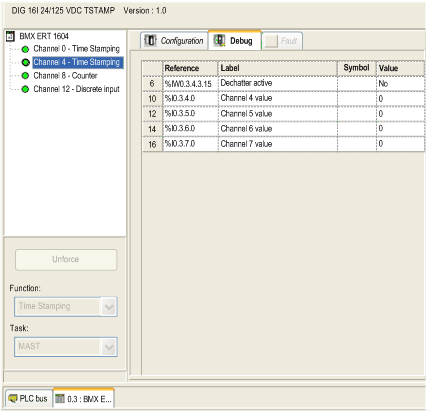
|
Object
|
Type
|
Label
|
Description
|
|---|---|---|---|
|
%Ir.m.x.0
|
EBOOL
|
Channel x value
|
Channel x input value
x = 4, 5, 6, 7 (group 1) or 8, 9, 10, 11 (group 2) or 12, 13, 14, 15 (group 3)
|
|
%IWr.m.x.3
|
INT
|
–
|
TS_DIAGNOSTIC_FLAGS
x = 4, 8, 12
|
|
%IWr.m.x.3.15
|
BOOL
|
Dechatter active
|
<Group Parameter>
If any edges discarded by dechatter filter for any channels under this group.
|
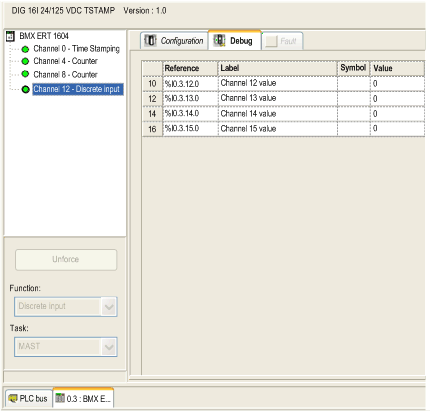
|
Object
|
Type
|
Label
|
Description
|
|---|---|---|---|
|
%Ir.m.x.0
|
EBOOL
|
Channel x value
|
Channel x input value
|
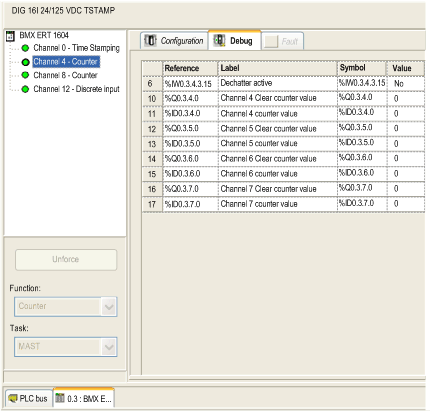
|
Object
|
Type
|
Label
|
Description
|
|---|---|---|---|
|
%IDr.m.x.0
|
DINT
|
Channel x counter value
|
Channel x counter value
x = 4, 5, 6, 7 (group 1) or 8, 9, 10, 11 (group 2) or 12, 13, 14, 15 (group 3)
|
|
%Qr.m.x.0
|
EBOOL
|
Channel x clear counter value
|
Channel x clear counter value
|
|
%IWr.m.x.3
|
INT
|
–
|
TS_DIAGNOSTIC_FLAGS
x = 4, 8, 12
|
|
%IWr.m.x.3.15
|
BOOL
|
Dechatter active
|
<Group Parameter>
If any edges discarded by dechatter filter for any channels under this group.
|
