|
Diagnosis
|
|


|
Original instructions
|
|
Diagnosis
|
|
|
Original instructions
|
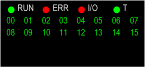
|
RUN
|
ERR
|
IO
|
T
|
00...15
|
Meaning
|
|---|---|---|---|---|---|
|
OFF
|
The module is not receiving power or inoperable
|
||||
|
OFF
|
ON
|
OFF
|
The module is not operational
|
||
|
OFF
|
BLK
|
OFF
|
OFF
|
The module is not configured or is configuring its channels
|
|
|
ON
|
BLK
|
OFF
|
X
|
Module has lost communication with CPU
|
|
|
ON
|
OFF
|
ON
|
X
|
BLK
|
Field power supply interruption
|
|
BLK
|
OFF
|
OFF
|
BLK
|
X
|
Downloading firmware
|
|
ON
|
X
|
X
|
OFF
|
X
|
No external time code input
|
|
ON
|
X
|
X
|
FLK
|
X
|
External time code is temporarily unstable but internal time quality is acceptable
|
|
ON
|
X
|
X
|
ON
|
X
|
Module clock synchronized with external time code
|
|
ON
|
OFF
|
OFF
|
X
|
ON
|
The logical input 1 present on the corresponding channel
|
|
ON: LED is on.
OFF: LED is off.
FLK: The LED is on faster flashing (flickering).
BLK: The LED is slower flashing (blinking).
X: Do not care.
|
|||||
