AS-i Bus Diagnostics
(Original Document)
General
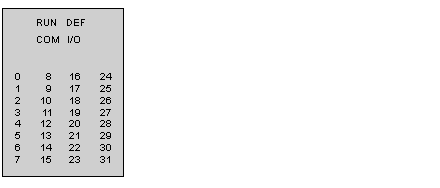
The AS-i master is equipped with a display panel comprising four Fipio standard display LEDs (RUN, DEF, COM, I/O) that provide information about its state. It also has 32 display LEDs for indicating the AS‐i bus configuration.
LED status:
LEDs
Permanently on
Blinking
Off
RUN (green)
Device operational.
-
-
DEF (red)
Device faulty.
Faulty Fipio link.
-
COM (yellow)
-
Indicates that a Fipio frame has been sent or received.
-
I/O (red)
Fault on the AS-i bus (configuration error, absence of AS-i power supply).
-
-
0 to 31 (red)
The slave is present and configured at this address.
Configuration fault at this address.
Absence of slave at this address.
LED and Addresses
LEDs 0 to 31 show the state of the AS-i bus configuration. An AS-i slave address corresponds to each LED; where the value of this address is between 1 and 31.
Connection to the Fipio Bus
When the TBX SAP 10 is switched on and is not connected to Fipio, its LEDs show the list of detected slaves (LDS). This is very useful during installation, as it enables the list of addresses used on the AS-i bus to be determined.
When the TBX SAP 10 is connected to Fipio, the active slaves (LAS) are displayed on the display panel LEDs. These are the slaves that can set outputs and send inputs.
If the TBX SAP 10 is disconnected from Fipio while running, only the active slaves (LAS) are displayed.