|


|
Original instructions
|
|
|
Original instructions
|
|
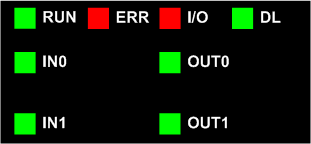
LED
|
Description
|
|||||||
|---|---|---|---|---|---|---|---|---|
|
ERR
|
RUN
|
I/O
|
DL
|
IN0
|
OUT0
|
IN1
|
OUT1
|
|
|
OFF
|
Module is faulty or switched off.
|
|||||||
|
OFF
|
BLK
|
–
|
BLK
|
–
|
Firmware download in progress.
|
|||
|
ON
|
OFF
|
Module error detected.
|
||||||
|
FLK
|
OFF
|
–
|
No channel configured.
|
|||||
|
BLK
|
ON
|
–
|
Module has lost communication.
|
|||||
|
OFF
|
ON
|
ON
|
OFF
|
–
|
BLK
|
–
|
BLK
|
Actuator supply fault.
|
|
BLK
|
–
|
BLK
|
–
|
Sensor supply fault.
|
||||
|
–
|
FLK
|
–
|
FLK
|
Output over load or short circuit.
|
||||
|
FLK
|
–
|
FLK
|
–
|
Broken wired detected on MPU.
|
||||
|
OFF
|
ON
|
OFF
|
–
|
Channels are operational.
|
||||
|
ON
|
–
|
–
|
–
|
Input 0 active state.
|
||||
|
–
|
–
|
ON
|
–
|
Input 1 active state.
|
||||
|
–
|
ON
|
–
|
–
|
Output 0 energized.
|
||||
|
–
|
–
|
–
|
ON
|
Output 1 energized.
|
||||
ONLED is steady on OFFLED is off FLKFlickering: ON for 50 ms, OFF for 50 ms, repeat. BLKBlinking: ON for 200 ms, OFF for 200 ms, repeat. –This LED is not used in determining the channel or module status. |
||||||||
