


Overview
You can open the either way:
By clicking in the context menu of a device that manages a fieldbus (for example, a PROFIBUS remote master (PRM) gateway or a HART module).
By clicking in the submenu of a field device.
The shows the field devices that are slaves of the gateway from which the editor was opened. It lets you view and edit the fieldbus by adding field devices and network coupling devices from the and configure them.
You can edit several fieldbusses at the same time by opening a for the gateway of each fieldbus.
Description
The following figure shows an example of the showing a PROFIBUS gateway and three slave devices.
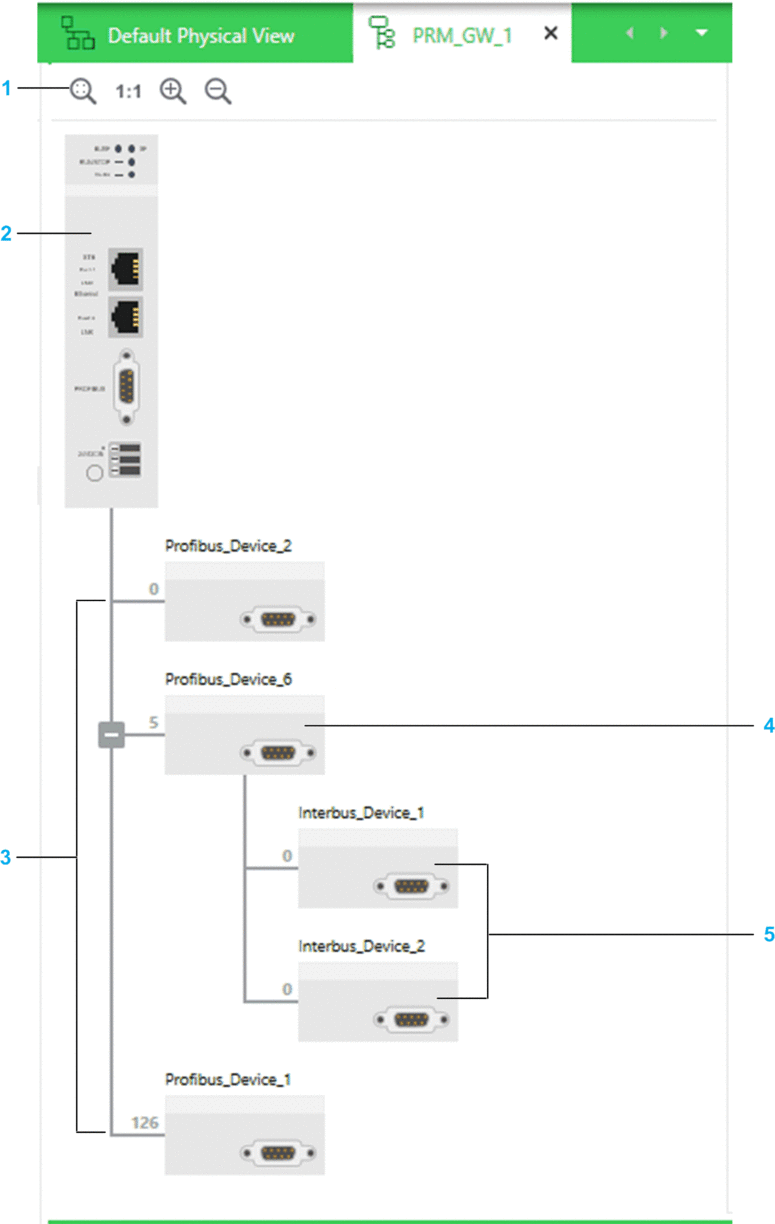
| Item | Description |
| 1 | |
| 2 | PRM gateway. |
| 3 | PROFIBUS slave devices. The software positions them automatically on the fieldbus as you create them. |
| 4 | PROFIBUS-to-INTERBUS gateway (coupling module) device. |
| 5 | INTERBUS slave devices. |
Context Menu Commands
The table describes the context menu commands that are specific to the . For a description of the other commands, refer to the topic describing device context menu commands.
Command |
Description |
|---|---|
/ |
Lets you copy or cut a field device and its DTM. NOTE: When you
copy a PROFIBUS-to-INTERBUS gateway, its slave devices are also copied.
|
|
Lets paste copied or cut field devices within the same fieldbus or another one of the same type that is open in another . |
Multiselection of Devices
When you select multiple devices in the , the pane shows the tabs and attributes that the devices have in common.