To implement the example, it is essential to have certain items of software on single PC. In particular, this will allow you to configure, set parameters for and operate the various devices used.
The software architecture is composed of:
-
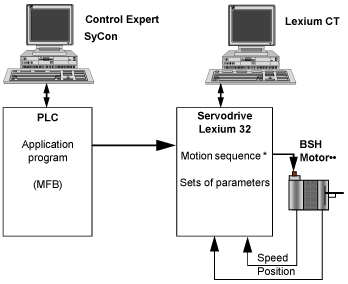
Control Expert, which is used to control the servodrive via the CANopen bus by programming movements
-
SyCon, which is used to declare and set parameters for the devices on the CANopen bus
-
Lexium CT, which is used to set parameters and adjust the Lexium 32 servodrive
Functional Diagram for the Lexium 32
The following diagram shows the different functions performed by the PLC and the servodrive:
* Motion sequence is only available for Lexium 32 Modular references.
As per the general architecture, the MFB offer using Control Expert is intended for certain devices.
The following table summarizes the devices and versions of the various items of software used in the example, which enable the use of MFBs using Control Expert:
|
Device
|
Software version used in the example
|
Firmware version used in the example
|
|
Premium
|
Control Expert V5.0
|
-
|
|
CANopen Configuration
|
SyCon V2.9
|
-
|
|
Lexium 32
|
Lexium CT V1.0
|
V1.x for Lexium 32 Advanced
V1.y for Lexium 32 Modular
|
Control Expert is a software workshop that is used to:
For the tutorial example, Control Expert particularly allows you to:
-
integrate a CANopen configuration previously created by the Sycon software
-
to declare axes in the Motion directory
-
use MFB function blocks from the MotionFunctionBlock library to simply access the servodrives’ main functions.
SyCon is a CANopen bus configuration tool that is used to define the communication interface.
The servodrives are on the CANopen bus. They should be declared in SyCon.
Saving the configuration creates a .CO file. To finalize the CANopen network configuration in Control Expert, the database (the .CO file) must be selected.
Lexium CT is a commissioning tool for Lexium 32 axis aimed at motion control applications.
Its graphic user interface provides a simple method for configuring the parameters of a standalone system or a PLC-controlled system.
For application development, the tool allows you to install and configure the axis of Lexium 32.