Replacing the Ethernet Communication Module
(Original Document)
Overview
You can replace the communication module at any time using another module with compatible firmware. A module can be replaced when power to the module is either:
The replacement module obtains its operating parameters over the backplane connection from the CPU. The transfer occurs either immediately (hot swap) or when power is next cycled to the device (cold swap).
NOTE: The operating parameters that the CPU sends to a replacement module do not include any parameter values that were edited in the original module using explicit messaging "SET" commands.
Replacing the Communication Module
Replacing the module involves removing the old module and mounting a new one in its place.
To remove a module:
Step
Action
1
Use a Phillips-head screw driver to detach the screw, located at the lower front side of the module, from the backplane.
2
Swing the bottom of the module away and up from the backplane, pivoting it on the hooks holding the module at the top of the backplane, until the module detaches from backplane connector:
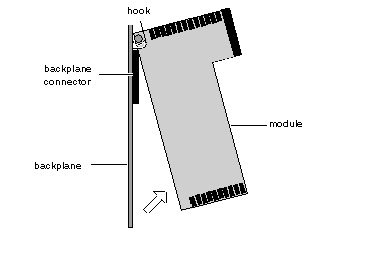
3
Lift the module up and off of the hooks located at the top of the backplane.
To install the replacement module, follow the instructions in the module mounting procedure.