|
Hardware Installation
|
|


|
(Original Document)
|
|
Hardware Installation
|
|
|
(Original Document)
|
|
Step
|
Action
|
|---|---|
|
1
|
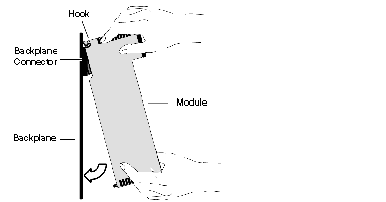
Holding the module at an angle, mount it on the two hooks located near the top of the backplane.
The following figure shows the correct way to hold the module.
 |
|
2
|
Swing the module down so the connector engages the backplane connector.
|
|
3
|
Use a Phillips-head screw driver to tighten the screw at the bottom of the module from 2 through 4 in-lbs or from .22 through .45 Newton meters of torque.
|
 WARNING WARNING |
|
HAZARD OF ELECTRICAL SHOCK OR BURN
Connect the ground wire to the protective ground (PE) terminal before you establish any further connections. When you remove connections, disconnect the ground wire last. Connect the Ethernet cable shield to PE ground at the Ethernet switch.
Failure to follow these instructions can result in death, serious injury, or equipment damage.
|

