


Function Description
This EFB allows you to use the Hot Standby function. It searches (together with the other Hot Standby EFBs) the configuration of the respective Quantum PLC for the required components.
These components refer to hardware that is actually connected. Therefore, the correct behavior of this EFB on the simulators cannot be guaranteed.
The HSBY_RD EFB checks system word %SW60 to see if a Hot Standby configuration exists:
If a Hot Standby configuration is present the contents of the command register are returned and the
HSBY_ConfigurationFoundoutput parameter is set to 1.If a Hot Standby configuration is not present the contents of the command register are returned and the
HSBY_ConfigurationFoundoutput parameter is set to 0.
EN and ENO can be configured
as additional parameters.
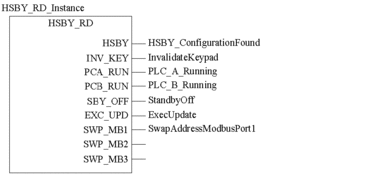
Representation in FBD
Representation:
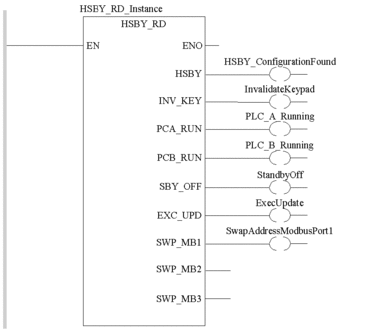
Representation in LD
Representation:
Representation in IL
Representation:
CAL HSBY_RD_Instance (HSBY=>HSBY_ConfigurationFound,
        INV_KEY=>InvalidateKeypad, PCA_RUN=>PLC_A_Running,
        PCB_RUN=>PLC_B_Running, SBY_OFF=>StandbyOff,
        EXC_UPD=>ExecUpdate, SWP_MB1=>SwapAddressModbusPort1)
Representation in ST
Representation:
HSBY_RD_Instance (HSBY=>HSBY_ConfigurationFound,
        INV_KEY=>InvalidateKeypad, PCA_RUN=>PLC_A_Running,
        PCB_RUN=>PLC_B_Running, SBY_OFF=>StandbyOff,
        EXC_UPD=>ExecUpdate,
        SWP_MB1=>SwapAddressModbusPort1);
Parameter Descriptions
Description of the output parameters:
Parameter |
Data type |
Meaning |
|---|---|---|
|
|
1 = Hot Standby configuration found 0 = Hot Standby configuration not found |
|
|
1 = The submenu for the Hot Standby PLC button is disabled. 0 = The submenu for the Hot Standby PLC button is not disabled. |
|
|
For the local rack PLC with the Hot Standby CPU A: 1 = Command Register is selected for RUN 0 = Command Register is selected for OFFLINE |
|
|
For the local rack PLC with the Hot Standby CPU B: 1 = Command Register is selected for RUN 0 = Command Register is selected for OFFLINE |
|
|
1 = ??? 0 = The Standby PLC switches to the OFFLINE mode as soon as both PLCs receive a different program. |
|
|
1 = Operating System update in the Standby-PLC is possible with the primary CPU PLC still running. 0 = ??? (After Operating System Update, the Standby CPU PLC changes back to the ONLINE mode.) |
|
|
If a switchover has occurred, for Modbus ports 1: 1 = There is no swapping of addresses 0 = There is swapping of address |
|
|
Not used. Reserved |
|
|
Not used. Reserved |