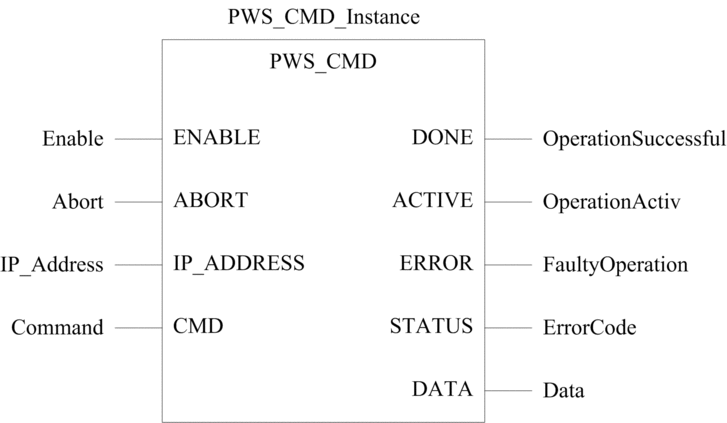
Description of the Function

The PWS_CMD function block is used to control redundant power supplies in a Modicon M580 PAC main rack with an Ethernet backplane (local or remote rack, other connected Modicon M580 PAC).

PWS_CMD function block provides the following command:

  • Swap master and slave power supplies.

  • Clear some diagnostic counters.

  • Start a power supply auto-diagnostic.

The power supply command is built with the PWS_CMD_DDT DDT type.

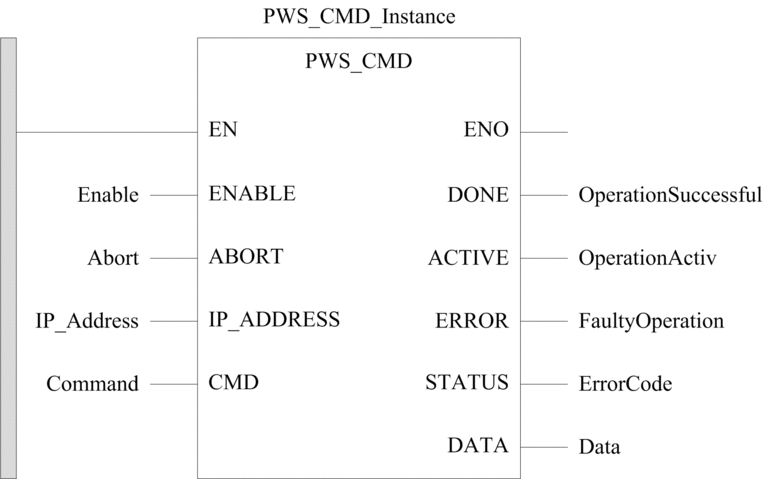
The additional parameters EN and ENO may also be configured.

NOTE: Redundant power supplies function is available on CPUs with OS firmware V2.12 or later, and BMECRA31210 communication adapters with firmware V2.16 or later.

FBD Representation

Representation:

LD Representation

Representation:
IL Representation

Representation:

CAL PWS_CMD_Instance (ENABLE:=Enable, ABORT:=Abort, IP_ADDRESS:=IP_Address, CMD:=Command, DONE=>OperationSuccessful, ACTIVE=>OperationActiv, ERROR=>FaultyOperation, STATUS=>ErrorCode, DATA=>Data)

ST Representation

Representation:

PWS_CMD_Instance (ENABLE:=Enable, ABORT:=Abort, IP_ADDRESS:=IP_Address, CMD:=Command, DONE=>OperationSuccessful, ACTIVE=>OperationActiv, ERROR=>FaultyOperation, STATUS=>ErrorCode, DATA=>Data);

Description of Parameters

The following table describes the input parameters:

Parameter

Type

Comment

Enable

BOOL

Set to 1 to send a command to a power supply.

Abort

BOOL

Set to 1 to abort the current operation.

IP_Address

STRING

The IP_Address parameter value depends on the location of the redundant power supplies to control:

  • In the local rack of the CPU: Leave the parameter empty or use a variable with an empty string, or enter the CPU IP address.

  • In a distant rack: Enter the IP address of the communication adapter of the rack that contains the power supply module to control.

    Example of IP address: 192.168.10.5 or 192.168.010.005

Command

PWS_CMD_DDT

Command data for the power supply to control.

The following table describes the output parameters:

Parameter

Type

Comment

OperationSuccessful

BOOL

Operation completed indication.

Set to 1 when the execution of the operation is completed successfully.

OperationActiv

BOOL

Operation in progress indication.

Set to 1 when the execution of the operation is in progress.

FaultyOperation

BOOL

Set to 1 if an error is detected by the function block.

ErrorCode

WORD

Code providing the detected error identification.

Data

ANY

Data needs to be declared (as a simple UINT for example), but it remains empty.

Description of PWS_CMD_DDT Type

Detailed description of PWS_CMD_DDT structure:

Field

Size

Value

Code

1 BYTE

Command code:

  • 1: Swap power supply role.

    NOTE: Both power supplies need to be set as target (PwsTarget = 3) to apply the swap command.
  • 2: Reserved.

  • 3: Clear power supply diagnostic counters.

    The following counters are cleared:

    • NbPowerOn

    • NbUnderVoltageLow

    • NbUnderVoltageHigh

    NOTE: This command applies to the power supply selected in the target (PwsTarget).
  • 4: Start power supply auto-diagnostic.

    This command triggers a sequence during which the slave power supply checks its capability to deliver the required current to the rack:

    • During this sequence: The slave power supply temporarily delivers the power on the rack and PwsDiag bit is set to 1.

      If a failure is detected on the output voltage: PwsDefect and PwsDefectVoltage bits are set to 1 and maintained until the slave power supply is power-cycled or replaced.

    • After this sequence: The master power supply plays its role again and provides full power to the rack.

    NOTE: Both power supplies need to be set as target (PwsTarget = 3) to apply the auto-diagnostic command.
    NOTE: Use this command punctually to apply the auto-diagnostic once. If a frequent status is needed, use this command once every minute for example. Do not send this command permanently because it may maintain the power supplies in a swap sequence.

PwsTarget

1 BYTE

Targeted power supply on the rack:

  • 1: Power supply on the left side of the rack (CPS1).

  • 2: Power supply on the right side of the rack (CPS2).

  • 3: Both power supplies.