


Function Description
The HSBY_SWAP function block is used to initiate
the swapping between primary and standby CPU.
EN and ENO can be configured as additional parameters.
This function block is convenient to be used to activate a swap by program logic. This swap between primary and standby CPU can be performed in the Hot Standby mode only.
Please refer to:
the Premium using EcoStruxure™ Control Expert, Hot Standby, User Manual for information regarding Premium hot standby CPUs.
the Quantum using EcoStruxure™ Control Expert, Hot Standby System, User Manual for information regarding Quantum hot standby CPUs.
This means that when the HSBY is running, the standby PLC becomes the primary PLC, and the old primary PLC becomes the standby PLC activated by the program logic.
%SW60, as described
in the Conditions for Switchover for Premium or in the Conditions
for Switchover for Quantum.| WARNING | |
|---|---|
Advantages of the Swapping Function
The advantages of swapping could be the following:
The health of the standby PLC is monitored. It is checked that the standby PLC can take over.
The switchover could be tested at regular intervals.
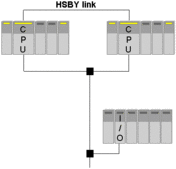
Example of a Hot Standby Application
The illustration below shows an example of a hot standby application:
Steps for Changing Status
A Hot Standby swapping function is processed as follows:
Step |
Action |
|---|---|
1 |
Status: PLC-A is the primary controller, PLC-B is the standby controller. PLC-A sets itself to offline. Result: PLC-B becomes the primary controller. |
2 |
Status: PLC-A is offline, PLC-B is the primary controller. PLC-B sets PLC-A to run-mode Result: PLC-A is the standby controller. |
3 |
Status: PLC-A is the standby controller, PLC-B is the primary controller. EFB outputs will be set. Result: Hot Standby swapping function is completed. |
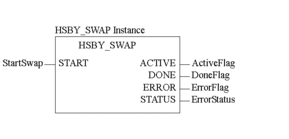
Representation in FBD
Representation
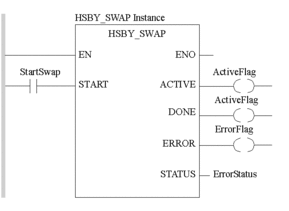
Representation in LD
Representation
Parameter Description
Description of the input parameter
Parameter |
Data Type |
Meaning |
|---|---|---|
|
|
The value of 1 must be applied until the operation has finished or until an error has occurred. |
Description of output parameters
Parameter |
Data Type |
Meaning |
|---|---|---|
|
|
|
|
|
|
|
|
|
|
|
An error code ( |
Error Status Table
The following table explains the error codes:
Error Codes |
Fault Description |
|---|---|
0 |
OK |
1 |
The function |
2 |
Hot Standby not activated ( |
3 |
Standby does not exist. |
5 |
The swap was unsuccessful. |
%SW60 and %SW61 reflect the status of the primary and the secondary
PLC.Switchover Using Command Register
System Bit %SW60.1 or %SW60.2
Another way of forcing a switchover is setting the bits in the Command Register. To achieve this, do the following:
Step |
Action |
|---|---|
1 |
Open file 1. |
2 |
Connect to the primary, |
3 |
Ensure the controller order of the primary is A or B. |
4 |
Access
|
5 |
Set bit to NOTE: Ensure that the standby switched to primary.
|
6 |
Open file 2. |
7 |
Connect to the new primary controller. |
8 |
Access the Command Register system bit used in step 4. |
9 |
Set bit to NOTE: Ensure that the standby controller is now online.
|
10 |
Ensure both primary and standby controllers are in Run Primary and in Run Standby mode. |