


Function Description
The SET_FILE_ATTRIBUTES function enables the file
attributes to be set.
The additional parameters EN and ENO can be configured.
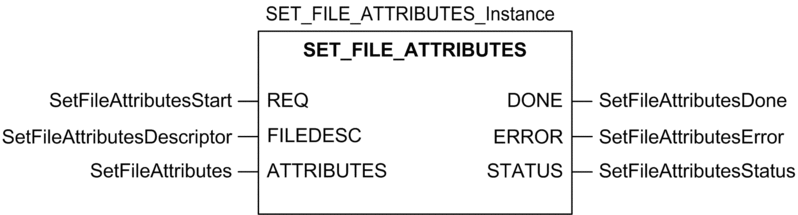
FBD Representation
The representation in FBD of the SET_FILE_ATTRIBUTES function is as follows:
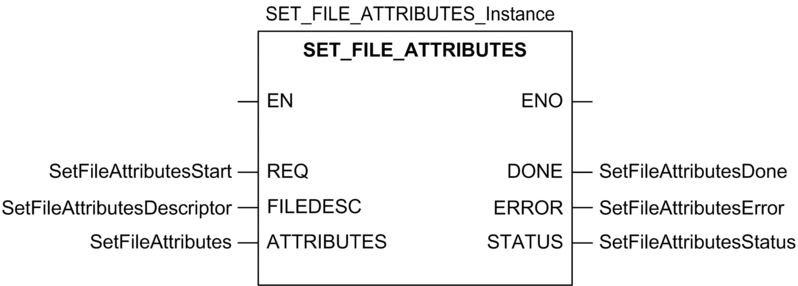
Ladder Representation
The representation in Ladder of the SET_FILE_ATTRIBUTES function is as follows:
IL representation
Representation:
CAL SET_FILE_ATTRIBUTES_Instance (REQ:=SetFileAttributesStart, FILEDESC:=SetFileAttributesDescriptor, ATTRIBUTES:=SetFileAttributes, DONE=>SetFileAttributesDone, ERROR=>SetFileAttributesError, STATUS=>SetFileAttributesStatus)
ST representation
Representation:
SET_FILE_ATTRIBUTES_Instance (REQ:=SetFileAttributesStart, FILEDESC:=SetFileAttributesDescriptor, ATTRIBUTES:=SetFileAttributes, DONE=>SetFileAttributesDone, ERROR=>SetFileAttributesError, STATUS=>SetFileAttributesStatus);
Parameter Description
The following table describes the input parameters:
Parameter |
Type |
Comment |
|---|---|---|
|
|
This parameter specifies the file
descriptor returned by the |
|
|
This parameter specifies the attributes to set. Only two attributes are accepted by the system:
|
Description of common parameters.