


Description of the function
The ITCNTRL function is a timer that triggers
the TIMER type event processing selected by the EVENT input, when
the current value reaches the preset value.
The preset and time base values are selected in the event processing properties dialog box.
Additional parameters EN and ENO can be configured.
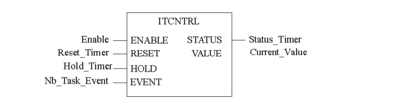
Representation in FBD
Representation:
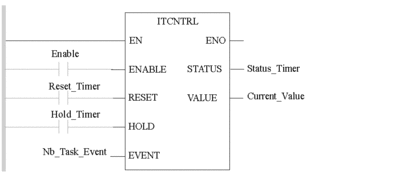
Representation in LD
Representation:
Representation in IL
Representation:
LD EnableITCNTRL Reset_Timer, Hold_Timer, Nb_task_Event , Status_Timer, Current_ValueRepresentation in ST
Representation:
ITCNTRL(ENABLE := Enable_Timer, RESET := Reset_Timer, HOLD := Hold_Timer, EVENT := Nb_Task_Event, STATUS => Status_Timer, VALUE => Current_Value);Description of the parameters
The following table describes the input parameters:
Parameter |
Type |
Comment |
|---|---|---|
|
BOOL |
Enable input selected,. on state 1: the event processing is triggered when the timer has elapsed. on state 0: no event is emitted |
|
BOOL |
On state 1 reset the timer |
|
BOOL |
On state 1 freeze the timer incrementation. |
|
BYTE |
Input word which determines the TIMER event processing number to be triggered. |
The following table describes the output parameters:
Parameter |
Type |
Comment |
|---|---|---|
|
WORD |
Status word:
|
|
TIME |
Current timer value. This value is increased by 0 to the preset value. When the preset value is reached, it is reset to 0. If the associated TIMER type event processing is confirmed, it is executed. |