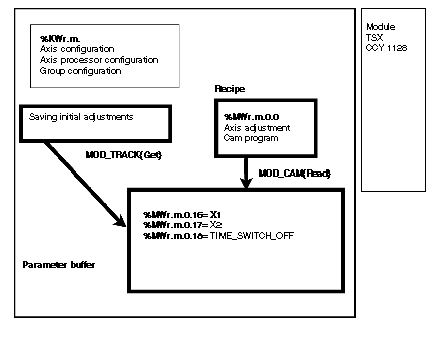
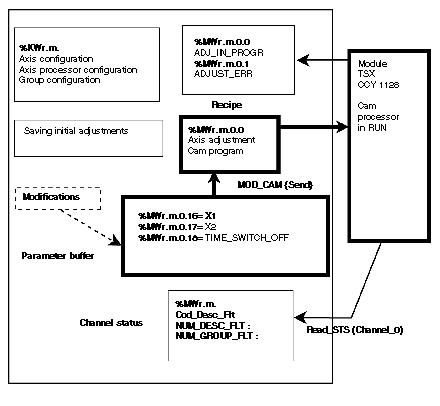
The MOD_CAM function is used to adjust a cam dynamically. Transferring new data does not require the to switch to STOP. If the transfer is successful, the new parameters are taken into account by the module. If the transfer is not successful, the cam processor remains in RUN with the old values.
The MOD_CAM function assigns the following parameters:
-
X1: Low threshold
-
X2: high threshold
-
TIME_SWITCH_OFF: timer
This function applies to a channel and therefore a variable type IODDT. We will use the variable Channel_0 of type T_CCY_GROUP0.
The exchange zone used by the MOD_CAM function is a buffer made up of reserved words: %MWr.m.0.16 to %MWr.m.0.18.
Loading the exchange zone
The exchange zone (buffer) can be preloaded:
-
with the initial adjustment values:
MOD_CAM(Channel_0,0,Group,Cam) action {Get}
-
with the current adjustment values:
MOD_CAM(Channel_0,1,Group,Cam) action {Read}
Sending the new values to the module
After modification in the buffer, the function:
-
MOD_CAM(Channel_0,2,Group,Cam) action {Send}
sends the new values to the module and updates the current parameters zone.
Group: identifies the group number
Cam: identifies the number
Initializing the parameter buffer
{Get} action or {Read} action
Initializing the parameter buffer
For cam 9 in group 2:
-
{Read}action: MOD_CAM(Channel_0,1,2,9)
-
{Get} action: MOD_CAM(Channel_0,0,2,9)
{Send} action
For cam 9 in group 2:
At the end of the exchange, the Adjust_err bit is set to 1 if the exchange has not been successful. The READ_STS function is used to update the channel status.
It contains the following data:
-
COD_DESC_FLT: error code found by the module in an adjustment data item in the cam.
-
NUM_DESC_FLT: codes the cam number containing a description error.
-
NUM_GROUP_FLT: codes the group number which contains the cam containing a description error.
-
COM_LOCAL_FLT: indicates an error in the group number or track number.