Time Zone and DST Setting
The external time receivers provide the local time format (year/month/day/minute/second) according to the country. The offsets for daylight saving time (DST) are different for different countries or zones.
The BMXERT1604T/H module converts the local time to the standard time format which is specified in IEC 61850 (ms from the UTC epoch of 1970-01-01 00:00:00:000). You must set the correct time zone and DST information in the Control Expert interface.
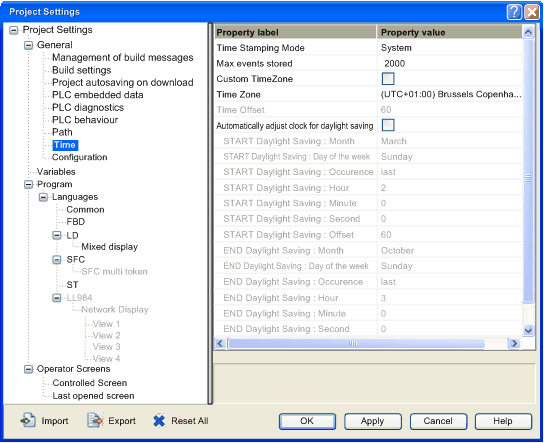
After the application is created in Control Expert, click Tools → Project Settings to display the Time tab as shown in the following figure.
You can select the required time zone by using this interface.
If the listed time zone options do not meet your requirements, the Time Offset can be used to set the minutes offset from UTC. To enable this function, check the Custom Timezone box.
NOTE: The daylight saving time configuration in the Project Settings window is not applicable to the BMXERT1604T/H module. The BMXERT1604T/H module always gets the daylight saving time to standard time switch information from the external clock (IRIG-B or DCF77) regardless of the DST settings in the Project Settings window.
An IRIG-B external clock must support IEEE1344 or IEEE C37.118 standard extension definition for DST information in order to maintain time accuracy during the switch between daylight saving time and standard time.
The module configuration of solution mode option for BMXERT1604T/H is done by the Time Stamping Mode option in previous interface. The available options are system and applicative.
The solution mode (time stamping mode) option must be selected according to the customer use case:
System:
When OPC (OFS by Schneider for example) is used to communicate with the SCADA.
Applicative (default):
When Modbus TCP is used to communicate with the SCADA.