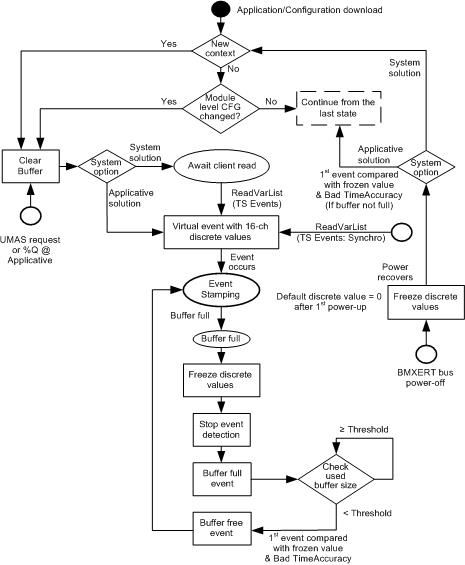
This section describes the module behavior modes for different phases or use cases. It involves the buffer management, the special features for system solution, and so on.
Application/Configuration Download
It includes all the operations which cause a physical download such as customer operation, auto download after power-on, and hot swap.
System/Application Solution
|
Parameter Type
|
Parameter Name
|
Valid Values
|
Details
|
|
Configuration
|
Solution mode option
|
System or Applicative
|
Effective range:
|
Module
|
|
Organization:
|
Group 0
|
NOTE: The system mode only takes time stamping channels into account.
The new context is defined as the occurrence of new configuration creation ID. The configuration creation is stored in the configuration parameter of BMX-ERT.
|
Parameter Type
|
Parameter Name
|
Valid Values
|
Details
|
|
Configuration
|
Configuration creation ID
|
Read-only
|
Effective range:
|
Module
|
|
Organization:
|
Group 0
|
The module level configuration parameters include:
-
Related voltage
-
Clock SYNC source
Reception of a TS Events client request shows that the client is connected.
Client Demand to Synchronize the Values
Reception of a synchronization request from the TS Events client (sent in case of restart of the SCADA).
The virtual event in the buffer queue is not generated for a real external event, it is provided to synchronize the values with the client. The values of discrete channels will be put in the event value byte of virtual event instead of the event polarity (rising or falling). The TimeAccuracy bits denote virtual event by 11100 as the TSInit symbol to be distinguished from normal events.
The 0...1 transition of the implicit variable SOE_UNCERTAIN indicates that Sequence Of Events (SOE) begins to be uncertain, while the 1...0 transition signals when it is sure to be OK again. The BMXERT module generates the virtual events (include buffer full and free events) according to the transition of this bit like it does at the transition of discrete input channel for a real event.
|
Parameter Type
|
Parameter Name
|
Valid Values
|
Details
|
|
Implicit %I
|
SOE_UNCERTAIN
|
0: Certain
1: Uncertain
|
Available in:
Device DDT
IODDT
Debug screen
|
The transition of SOE_UNCERTAIN will be applied for virtual event and buffer full/free event
|
SOE_UNCERTAIN Transition
|
Virtual Event (Value Synchro)
|
Buffer full/Free Event
|
|
0>1 (if not already 1)
|
When synchro request is received (includes init synchro)
|
When buffer-full is detected
|
|
1>0
|
When entering event stamping state
|
When entering event stamping state
|
It means the detection for external events is stopped. But the virtual events corresponding to inserting time stamping channels is registered. Once it recovers, the virtual event is set in the buffer before the first external event is being put into this.
In addition to the 2 sources mentioned in the previous chart (buffer full or client demand to synchronize the values), the module also stops event detection on a field power supply fault phase (if the field power supply is
monitored).
After recovering from the buffer free event or bus power off, the first event is compared with the last frozen discrete values, and the TimeAccuracy must be put as 11110 which denotes the invalid time. The buffer full/free event gets the normal TimeAccuracy bits (01010).
The initialization means power-on, hot swap, application download, and module/group reboot after online configuration change.
BMXERT Field Power Failure Asserted
BMXERT field power failure asserted means the supply monitoring is enabled and the field power failure is detected.