|
Configuring the SSI Module BMX EAE 0300 on Control Expert
|
|


|
Original instructions
|
|
Configuring the SSI Module BMX EAE 0300 on Control Expert
|
|
|
Original instructions
|
|
Step
|
Action
|
|---|---|
|
1
|
In the Project browser double-click on Configuration then on 0:Bus X and on 0:BMX XBP •••
|
|
2
|
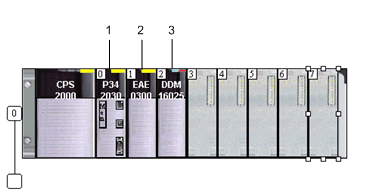
In the Bus X window, select slot 1 and double-click
|
|
3
|
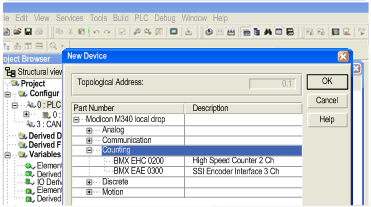
Choose the BMX EAE 0300 SSI module
 |
|
4
|
Confirm with OK.
|
|
Step
|
Action
|
|---|---|
|
1
|
Select the first channel SSI 0
|
|
2
|
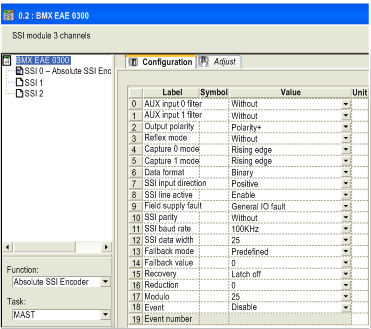
In the Function drop menu select Absolute SSI Encoder
|
|
3
|
Configure the channel with the values shown in this screenshot:
 |
|
Step
|
Action
|
|---|---|
|
1
|
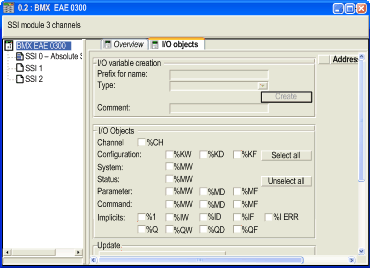
In the BMX EAE 0300 configuration window (double click the module if the window is not opened) and select the I/O objects tab
|
|
2
|
Click on the I/O object prefix address %CH then on the Update grid button, the channel address appears in the I/O object grid
|
|
3
|
Click on the line %CH0.1.0 and then enter a channel name in the Prefix for name zone
Name: Gate_Position
|
|
4
|
Click Create
 |
