|
LED Indicators
|
|


|
Original instructions
|
|
LED Indicators
|
|
|
Original instructions
|
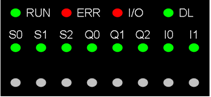
|
Module status
|
LED indicators
|
|||||||||||
|---|---|---|---|---|---|---|---|---|---|---|---|---|
|
RUN
|
ERR
|
I/O
|
DL
|
S0
|
S1
|
S2
|
Q0
|
Q1
|
Q2
|
I0
|
I1
|
|
|
The module is not receiving power or has inoperative
|
 |
|||||||||||
|
The module is inoperative
|
|
 |
|
–
|
–
|
–
|
–
|
–
|
–
|
–
|
–
|
–
|
|
The module is not configured or is configuring its channels
|
|
 |
–
|
|
|
|
|
|
|
|
|
|
|
Module has Lost communication with CPU
|
|
|
–
|
|
–
|
–
|
–
|
–
|
–
|
–
|
–
|
–
|
|
Field Power Supply inoperative
|
|
|
|
|
|
|
|
|
|
|
|
|
|
Downloading firmware
|
|
|
|
|
–
|
–
|
–
|
–
|
–
|
–
|
–
|
–
|
|
S0 has a detected line error
|
|
|
|
|
 |
–
|
–
|
–
|
–
|
–
|
–
|
–
|
|
S1 has a detected line error
|
|
|
|
|
–
|
|
–
|
–
|
–
|
–
|
–
|
–
|
|
S2 has a detected line error
|
|
|
|
|
–
|
–
|
|
–
|
–
|
–
|
–
|
–
|
|
Qx has a short circuit
|
|
|
|
|
–
|
–
|
–
|
|
|
|
–
|
–
|
|
Channels are operational
|
|
|
|
|
–
|
–
|
–
|
–
|
–
|
–
|
–
|
–
|
|
"Absolute SSI Encoder" mode is selected and no error detected
|
|
|
|
|
|
–
|
–
|
–
|
–
|
–
|
–
|
–
|
|
|
|
|
|
–
|
|
–
|
–
|
–
|
–
|
–
|
–
|
|
|
|
|
|
|
–
|
–
|
|
–
|
–
|
–
|
–
|
–
|
|
|
Voltage is present on Q0
|
|
|
|
|
–
|
–
|
–
|
|
–
|
–
|
–
|
–
|
|
Voltage is present on Q1
|
|
|
|
|
–
|
–
|
–
|
–
|
|
–
|
–
|
–
|
|
Voltage is present on Q2
|
|
|
|
|
–
|
–
|
–
|
–
|
–
|
|
–
|
–
|
|
Voltage is present on I0
|
|
|
|
|
–
|
–
|
–
|
–
|
–
|
–
|
|
–
|
|
Voltage is present on I1
|
|
|
|
|
–
|
–
|
–
|
–
|
–
|
–
|
–
|
|
LED on LED off LED flashing slowly LED flashing fast –An empty cell indicates that the state of the LED(s) is not taken into account |
||||||||||||
