|
Mounting the SSI Module BMX EAE 0300
|
|


|
Original instructions
|
|
Mounting the SSI Module BMX EAE 0300
|
|
|
Original instructions
|
  DANGER DANGER |
|
HAZARD OF ELECTRIC SHOCK
Failure to follow these instructions will result in death or serious injury.
|
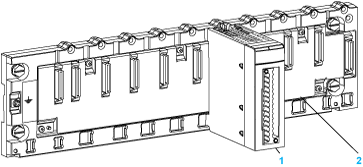
|
Number
|
Description
|
|---|---|
|
1
|
SSI module BMX EAE 0300
|
|
2
|
Standard rack
|
|
Step
|
Action
|
Illustration
|
|---|---|---|
|
1
|
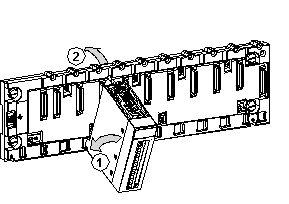
Position the locating pins situated at the rear of the module (on the bottom part) in the corresponding slots in the rack.
NOTE: Before positioning the pins, make sure you have removed the protective cover from the rack slot. |
Steps 1 and 2
 |
|
2
|
Swivel the module towards the top of the rack so that the module sits flush with the back of the rack. It is now set in position.
|
|
|
3
|
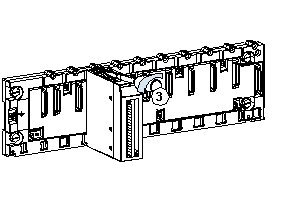
Tighten the mounting screw to ensure that the module is held in place on the rack.
Tightening torque: 0.4...1.5 N•m (0.30...1.10 lbf-ft)
|
Step 3
 |
