Description of the Counting Module Screens
Original instructions
Introduction
The various available screens for the BMX EHC 0200 counting modules are:
Description of the Screens
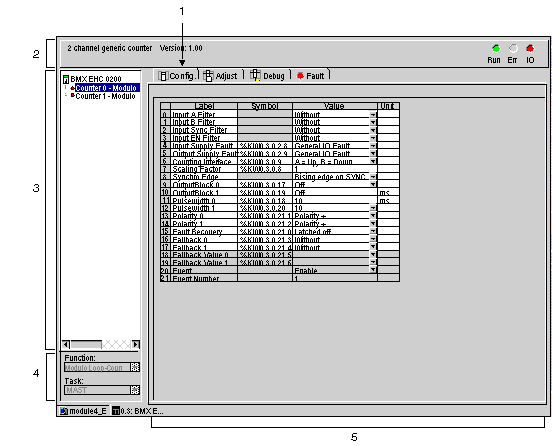
The following diagram presents the counting modules configuration screen.
The following table presents the parts of the various screens.
Number
Element
Function
1
Tabs
The tab in the foreground indicates the mode in progress (Configuration in this example). Every mode can be selected using the respective tab. The available modes are:
  • Configuration
  • Adjust
  • Debug (which can only be accessed in online mode)
  • Faults (which can only be accessed in online mode)
2
Heading area
Provides an abbreviation as a reminder of the module and module status in online mode (LEDs).
3
Module area
Is used:
  • By clicking on the reference number, to display the tabs:
    • Description which gives the characteristics of the device.
    • I/O Objects or Device DDT depending on the I/O data type selected at module insertion in the Control Expert project.
Channel area
Is used:
  • By clicking on the channel (Counter) number, to display the tabs:
    • Configuration which gives the characteristics of the channel. By default in topological I/O data model, no function is configured. By default in device DDT data model, all channels are Frequency Mode configured and a channel can not be set to None.
    • Adjust: consists of various sections to be completed (parameter values), displayed according to the choice of counting function.
    • Debug: displays the status of the inputs and outputs, as well as the various parameters of the current counting function (in online mode).
    • Fault which shows the device errors (in online mode).
4
General parameters area
Allows you to select the counting function and the task associated with the channel:
  • Function: counting function among those available for the modules involved. Depending on this choice, the headings of the configuration area may differ.
  • Task: defines the task through which the channel's implicit exchange objects will be exchanged.
These choices are only possible in offline mode.
5
Parameters in progress area
This area has various functionalities which depend upon the current mode:
  • Configuration: is used to configure the channel parameters.
  • Adjust: consists of various sections to be completed (parameter values), displayed according to the choice of counting function.
  • Debug: displays the status of the inputs and outputs, as well as the various parameters of the current counting function.
  • Fault: displays the errors that have occurred on the counting channels.