Control Expert Behavior
Original instructions
Changed Parameter Handling
To fulfill the IEC demands the normal EDT (Elementary Data Types) parameter handling was changed from Concept to Control Expert.
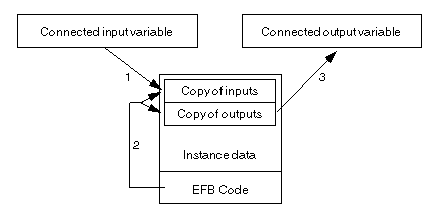
The following figure describes the actual implementation in Control Expert.
The EFBs no longer get pointers to their connected pin variables.
They always get the data by value.
In every scan the application code updates the copy of the input data in the instance data, before the function block is called (1).
The copy of the pin data is located in the instance data of the block and the function block code always works on the instance data (2).
After the function block code execution the application code copies the updated function block output data from the instance data to the connected output variables (3).
This is valid for all EDTs. Derived data types and more complex data types are treated still by reference in some cases.
Addressing Modes
The addressing mode of a Function Block element is directly linked to the type of the element.
The currents known addressing modes are:
Table with four columns and legend
-
EDT (Except STRING)
STRING
DDT Array
DDT Struct
ANY_ ARRAY
ANY...
Input parameter
VAL
L-ADR-LG
L-ADR-LG
L-ADR
L-ADR-LG
L-ADR-LG
Input_Output parameter
L-ADR 1
L-ADR-LG
L-ADR-LG
L-ADR
L-ADR-LG
L-ADR-LG
Output parameter
VAL
VAL
L-ADR-LG
VAL
L-ADR-LG
L-ADR-LG
Public Variable
VAL
VAL
-
VAL
-
-
Private Variable
VAL
VAL
-
VAL
-
-
1 
Except for BOOL type, the addressing mode is VAL.
Function Block Invocation
The following rules must be taken into account while invoking a Function Block instance:
All other kind of parameters could be omitted while Function Block Instance invocation.
For input parameters, the following rules are applied (in the given order):
EFB and DFB output result when not enabled in a program section
When a DFB instance or an EFB instance is not enabled it means that the code is not executed. But if an output is linked to a variable, the output is applied even if the DFB or EFB instance code is not executed, then the variable is set at the value of the DFB or EFB instance output.
EFB and DFB output linked to a variable and to another EFB or DFB
If a DFB instance or EFB instance output, is linked to a variable and at the same time to another FFB, the editor display could show a difference between the link and the variable value.
The reason is: