The access authorizations defined in Concept are not converted to Control Expert.
Security under Control Expert does not - refer to the corresponding installation as it does under Concept.
Program execution using Concept and Control Expert are different. It can lead to different behavior during the first program run after a restart.
Program execution for Concept:
-
Write the outputs (program run n-1)
-
Read the inputs (program run n)
-
Program processing
Program execution for Control Expert:
-
Read the inputs
-
Program processing
-
Write the outputs
Example:
In Concept, you have assigned a 4x register to a digital output and stopped the PLC when the value is "true". After a restart, the value remains "True" during the first program run even if you have modified the process conditions.
Specified Execution Order
The execution order in the function block language in Concept is determined first of all by how the FFBs are positioned. If the FFBs are then linked graphically, the execution order is determined by the data flow. After this the execution order can be changed based on the intention.
In Control Expert after conversion it is not possible to see in what order the FFBs were positioned. Therefore, whenever the order cannot be determined unambiguously from the data flow rule alone, the order is defined by the Concept project.
The defined execution sequence is shown by means of a rectangle with the step number in the upper right-hand corner of the FFB.
The single sweep function is no longer supported by Control Expert.
The corresponding functionality can be realized in Control Expert using the Debug function "Breakpoints".
Using Concept, all platform dependent EFBs can be placed at any time and loaded in all PLC platforms. Any errors detected during the program execution are written to the message memory.
In Control Expert, only valid EFBs can be placed. Download to the PLC is only possible if the EFBs used are consistent with the PLC platform.
Reference Data Editor (RDE)
RDE tables created in Concept are converted to Control Expert when they are placed in the same directory as the Concept ASCII file.
Because of different restart behaviors after a power outage, it is possible that the global variable states of two PLCs that restart differently are not the same after the first program run.
There are two different types of restart behavior:
-
All 16 bit PLCs (all Momentum, Quantum 113, 213, 424) continue executing the program at the point at which it was interrupted.
-
All 32 bit PLCs (Quantum 434, 534) start the program run at the beginning.
Control Expert supports the 1st type of restart behavior described above.
The Concept State RAM register addresses are assigned to IEC conforming addresses in Control Expert.
I/O module addresses are converted either to "flat" addresses or to topological addresses.
State RAM Register Without I/O Module
State RAM register addresses without assigned I/O modules are represented with "flat" addresses:
|
Concept
|
Control Expert
|
|
4x
|
%MWx
|
|
3x
|
%IWx (1)
|
|
0x
|
%Mx
|
|
1x
|
%Ix
|
|
(1) = If Modicon M340 is the target platform, there is no equivalent for input State RAM registers (%IWx). The addresses are converted formally to flat addresses and must be corrected by the user.
|
For this, the register number is added to the end of the introduction.
The address reads as follows:
%[IM][W]Register number
State RAM Register With I/O Module
State RAM register addresses with assigned I/O modules can either be represented on Quantum with "flat" addressing as described above or with topological addressing.
To define that State RAM register addresses will be converted to topological addressing, open the Conversion Settings tab via Tools → Options in Control Expert and activate the Generate Topological Addresses for Quantum check box before converting.
If the check box is not activated, the State RAM register addresses are converted to "flat" addresses (for Quantum only).
If Compact or Momentum applications are converted with the conversion wizard, topological addressing is used by default, regardless whether the check box is activated or not.
State RAM register addresses with assigned I/O modules (topological)
|
Concept
|
Control Expert
|
|
4x
|
%QWt
|
|
3x
|
%IWt
|
|
0x
|
%Qt
|
|
1x
|
%It
|
|
t = topological description
|
The following information is read from the configuration to provide a sufficient topological description of State RAM register addresses with assigned I/O modules:
The complete address reads as follows:
%[IQ][W]<\Busnumber.Drop\>Rack.Module.Channel
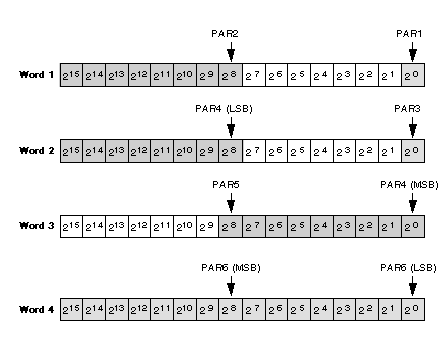
State RAM Assignment Using Derived Data Types
In Concept, data structure elements begin at BYTE limits.
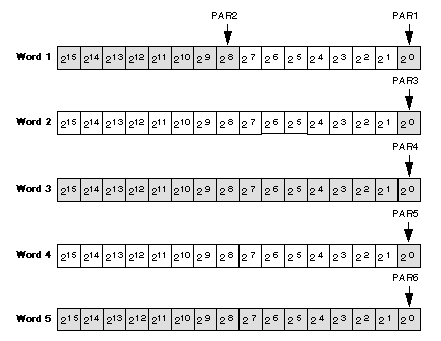
In Control Expert, data structure elements begin at WORD limits.
Example of a derived data type:
TYPE
  SKOE:
   STRUCT
   PAR1: BOOL;
   PAR2: BYTE;
   PAR3: BOOL;
   PAR4: WORD;
   PAR5: BOOL;
   PAR6: WORD;
   END_STRUCT;
END_TYPE
The derived data types are stored in the state RAM when using Concept:
The same derived data types are stored in the state RAM when using Control Expert:
Timer, Date, Battery Monitoring
Timer address, date/time of day and the battery monitoring can no longer be assigned to the State RAM with Control Expert. All required information can be accessed via the control panel.
When Concept is converted to Control Expert, DFBs are created which can be simulated in Control Expert without further manual modifications of these functionalities.
NOTE: The Concept Timer Register is 16 bits long and has an accuracy of 10 ms. The equivalent system word %SW18 in Control Expert is 32 bits long and has an accuracy of 100 ms. If this accuracy is not sufficient, the FREERUN function from the System library can be used, which delivers accuracy of up to 1 ms.
NOTE: When dealing with days of the week, the value 1 corresponds to Sunday in Concept and Monday in Control Expert.
Quantum Diagnostics Words
In Control Expert, the diagnostics words are specified to be a certain number:
-
Local I/O: 16 Words
-
RIO I/O: 16 Words
-
DIO I/O: 16 Words
In Concept it was also possible to specify a smaller number of diagnostics words for the individual I/Os.
Keep this difference in mind, since it can cause problems.
The topological addresses are assigned so that if the hardware configuration remains the same, they occupy the same I/O connections as they were assigned in Concept.
The user sees the hardware addresses in Control Expert that they are using, without having to carry out the intermediate step via the State RAM.
Located BOOL variables in Concept are converted to EBOOL variables in Control Expert.
Control Expert provides this new EBOOL variable for the detection of transitions (edges). This "Elementary BOOL type" is used for %Ix, %Mx and unlocated variables.
EBOOL variables can be forced.
The EBOOL variable provides three informational items:
-
Current value
-
Historical value
-
Force information.
Only the current value can be accessed, the other values can only be accessed via product specific functions.
Longer Cycle Time via EBOOL
In Control Expert, as opposed to Concept, the edge and force information is updated from EBOOL variables during program runtime.
For this reason on the Quantum CPU 434, CPU 534 and CPU 311 platforms the assignment of EBOOL variables is only half as fast as the assignment of BOOL variables.
NOTE: If you need variables in the signal memory, use BOOL variables and assign them to the memory area %MW (e.g. BoolVar : BOOL AT %MW10). Otherwise use unlocated BOOL variables.
Constants in Concept are converted to write-protected variables in Control Expert.
Control Expert does not provide constants. Comparable functionality is achieved using write-protected variables.
In Concept, the 0x registers are not buffered. They are reset to zero with every warm restart.
In Control Expert, the %Mx registers are buffered ("RETENTIVE", "VAR_RETAIN"), i.e. Conform to IEC.
Do not use the possibility to set the 0x register to zero on every warm restart if you use a project in Concept that you want to convert to Control Expert.
NOTE: If you require non-buffered behavior, define the warm restart event with the SYSSTATE function block and explicitly copy the value 0 (zero) to the %Mx register.
Quantum Remote I/O Control
In Concept, only LL984 sections can be assigned I/O stations (Drops). This is not possible in Concept projects with IEC conforming sections (FBD, LD, SFC, IL, ST).
Control Expert offers this option, in which a logic is recreated in accordance with LL984. This logic must be entered manually, however.
Example of a section processing order in Control Expert:
Section n-2
Section n-1
RIO call (u,v,w)
Section n
Section n+1
RIO call (u+1,w,x)
Section n+2
RIO call (u+2,x,y)
RIO (x,y,z) is the explicit I/O call here:
-
Write the outputs to the I/O station x.
-
Wait at the inputs of the I/O station y.
-
Prepare the inputs of the I/O station z.
NOTE: Take these new settings into consideration when structuring your project.
Setting Variables Cyclically
Unlocated variables cannot be set cyclically in Control Expert. (It is possible in Concept).
If you need to set variables cyclically in your project, you should use located variables.
%Mx/%1x registers (EBOOL) can be forced.
%MWx/%IWx registers can be set cyclically (only numerical values).


 WARNING