The Conversion Process
Original instructions
General
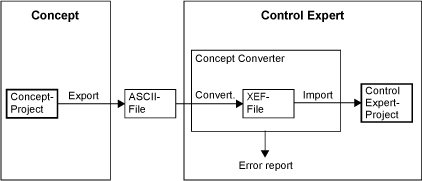
A Concept project is exported from Concept and then converted automatically into a Control Expert project using the Control Expert Concept Converter.
Conversion Process
Representation of the conversion process:
Description of the conversion levels:
Level
Description
1
A project is exported from Concept.
An ASCII file is created.
2
The Control Expert Concept Converter is called.
The ASCII file is converted into an XEF file.
3
The XEF file is imported into Control Expert.
A Control Expert project is created.
4
The error report is checked.
There must be no errors.
5
The project is now available in Control Expert and can be generated and then loaded into a PLC or processed in Control Expert.
Error Report and Analysis
Errors that occur during conversion are logged in an error report and displayed in an output window.
Substitute objects are used in place of objects that cannot be converted. The Control Expert project can be analyzed using the main menu Create → Analyze Project. Subsequently messages are displayed in the output window to find the substitute objects.
The errors displayed in the output window must be corrected manually to ensure the Control Expert project runs correctly.
Animation tables converting process
In Concept, RDE tables could have different names, the concept converter creates an animation table for each data editor reference file found in the project folder.
For Prowrx32 Data Watch windows, every data Watch window will result in an Animation table.