|
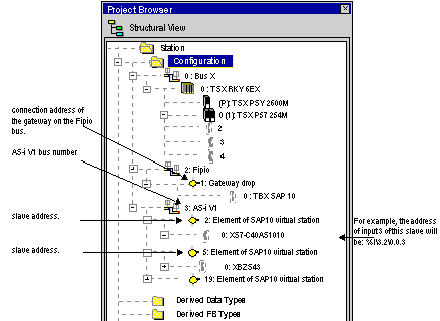
Display of AS-i Devices Connected to the TBX SAP 10 Module in the Project Browser
|
|


|
(Original Document)
|
|
Display of AS-i Devices Connected to the TBX SAP 10 Module in the Project Browser
|
|
|
(Original Document)
|
|
Step
|
Action
|
|---|---|
|
1
|
Close the configuration screen of the AS-i module (if open).
|
|
2
|
In the project browser, right click on the AS-i module and choose properties
|
|
3
|
In the Bus Properties window, choose the number of the desired bus (between 1 and 999, inclusively).
Note: You cannot use the number 2 for the AS-i bus because it is reserved for the Fipio bus.
|
|
4
|
Click on OK to confirm the change.
Result: Addressing of slave devices directly associated with the AS-i module is automatically updated.
|
