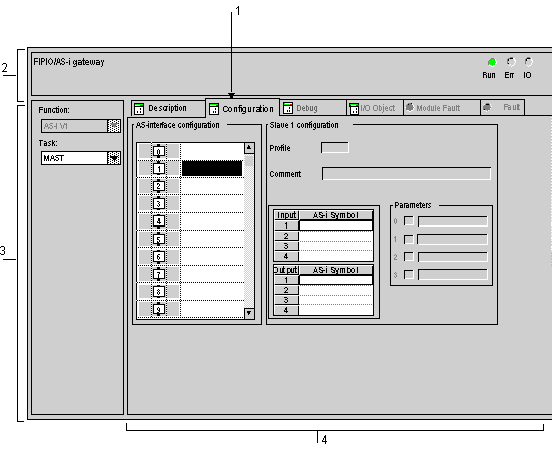
TBX SAP 10 Module Configuration Screen
(Original Document)
General
The configuration screen is used to configure the required parameters of the TBX SAP 10 module.
Illustration
The figure below represents a configuration screen.
Description
The following table shows the various elements of the configuration screen and their functions.
Number
Element
Function
1
Tabs
The tab in the foreground indicates the mode in progress (Configuration in this example). Every mode can be selected using the respective tab. The available modes are:
  • Description which gives the characteristics of the device,
  • Configuration,
  • I/O Objects which is used to presymbolize the input/output objects,
  • Debug which can be accessed only in online mode,
  • Fault and Module Fault can only be accessed in online mode.
2
Module area
This provides a reminder of the module's abbreviated title and the module status in online mode.
In the same area there are 3 LEDs which indicate the status of the module in online mode :
  • RUN indicates the operating status of the module.
  • ERR indicates an internal fault in the module.
  • I/O indicates a fault from outside the module or an application fault.
3
General parameters area
This lets you choose the general parameters associated with the channel :
  • Function: the AS-i V1 function is frozen (grayed out).
  • Task: defines the MAST or FAST task through which the channel's implicit exchange objects will be exchanged.
4
AS-i and Slave Configuration area
This lets you configure the channel configuration parameters. Certain choices may be frozen and appear in gray.
It is divided into four areas:
  • The AS-interface configuration,
  • The characteristics of the selected slave,
  • The parameters applied to the selected slave,
  • The symbols of the inputs and outputs associated with a device.