|


|
Original instructions
|
|
|
Original instructions
|
|
Filtering level
|
Effect on the input signal
|
|---|---|
|
Without(1)
|
Pulse detected: 1 μs
Frequency detected: 500 kHz
|
|
Low(2)
|
Pulse rejected: Less than 4 μs
Frequency cut: 100 kHz
|
|
Medium
|
Pulse rejected: Less than 40 μs
Frequency cut: 10 kHz
|
|
High
|
Pulse rejected: Less than 400 μs
Frequency cut: 1 kHz
|
|
(1)
When the Input Sensor filter parameter is set to Without, the pulse rejection is not specified and the frequency cut is above 500 kHz. This option may be used for incremental encoders only.
(2)
Default value for Input Sensor filter parameter in Control Expert configuration screen.
NOTE: Frequencies are given for square wave signal. |
|
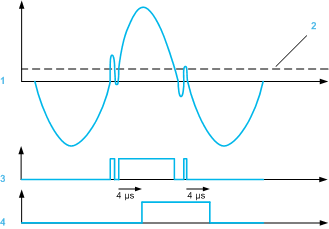
1Noisy MPU signal
2Threshold
3Input signal
4Signal filtered
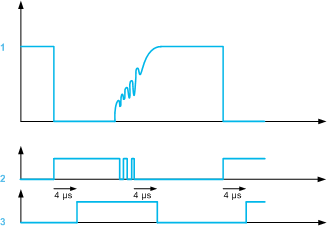
1Noisy APU signal
2Input signal
3Signal filtered
