|
Configuration of the ATV 71 Node
|
|


|
(Original Document)
|
|
Configuration of the ATV 71 Node
|
|
|
(Original Document)
|
|
Step
|
Action
|
|---|---|
|
1
|
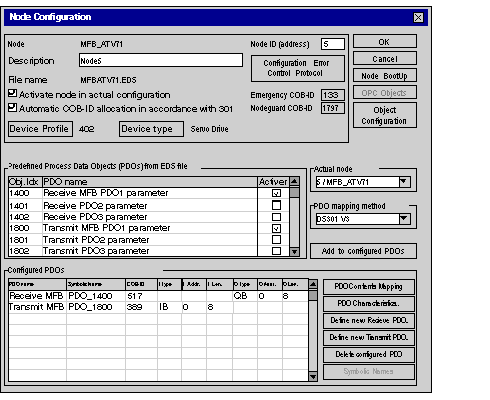
In the main screen, double-click on Node 5.
Result: the node configuration screen is displayed:
 |
|
2
|
Click OK to confirm node configuration.
|
|
3
|
Save the CANopen project with the name MFB_ATV71.co.
Note: remember where the .CO file is saved since the configuration will be imported in Control Expert.
|
|
Type of servodrive
|
Name given to node
|
Name of .eds file
|
PDOs to add
|
Configuration object to add
|
|---|---|---|---|---|
|
ATV 71
|
MFB_ATV71
|
MFBATV71.eds
|
1st receive PDO
1st transmit PDO
|
-
|
